Showing posts with label FLASHBACK. Show all posts

Monday, March 7, 2022

Oracle Flashback Technology


Oracle Flashback Technology


Flashback Recovery is a new enhancement to the 10g database for the DBA's toolkit. Effectively, it's an "Oh shit!" protection mechanism for DBAs as it reduces recovery time from hours to minutes. Ask any DBA about the main cause of application outage - other than hardware failure - and the answer will be "human error". Such errors can result in logical data corruption and can bring down the complete system. Part of being human is making mistakes. Without advance planning, these errors are extremely difficult to avoid, and can be very difficult to recover from. Typical user-errors may include the accidental deletion of valuable data, deleting the wrong data, or dropping the wrong table.

So, the big question is: How can we protect a database from human error?

The answer is a technology called "Flashback" - a major enhancement in 10g, as it revolutionizes recovery by working just on the changed data.

Flashback provides:

  • An effective way to recover from complex human errors
  • Faster database point-in-time recovery
  • Simplified management and administration
  • Little performance overhead

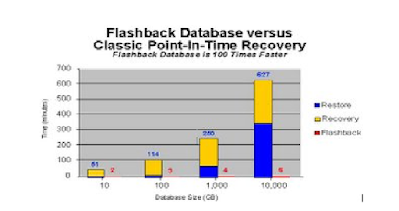
The performance overhead of enabling Flashback Database is less than 2%. While you may not be willing to sacrifice any performance overhead for your production database, think about the trade-off. If you could recover the database in minutes instead of hours, saving your company millions of dollars in lost revenue, wouldn't you be willing to give 2% of the resources to Flashback Database?

Below is a chat to show how quickly Flashback can recover your database.


 Architecture:

There are some basic prerequisites for Flashback recovery:

The database should be in Archive Log Mode. Issue the alter database archivelog command when the database is mounted.

Some of the parameters should be set as follows:

  • DB_FLASHBACK_RETENTION_TARGET: This specifies the time limit for deleted data to be maintained in the database. E.g. alter system set DB_FLASHBACK_RETENTION_TARGET=4320, i.e. 72 hours
  • DB_RECOVERY_FILE_DEST_SIZE: This specifies the maximum data that can be retained. E.g. alter system set DB_RECOVERY_FILE_DEST_SIZE=536870912, i.e. 512 MB
  • DB_RECOVERY_FILE_DEST: This specifies the destination for the flashback data. E.g. alter system set DB_RECOVERY_FILE_DEST='/u02/fra';

Types of Flashback recoveries

There are six basic types of Flashback recovery, discussed below in detail:

1.    Flashback Query

2.    Flashback Version Query

3.    Flashback Transaction Query

4.    Flashback Table

5.    Flashback Drop (Recycle Bin)

6.    Flashback Database


Flashback Query:

You can perform a Flashback Query using a SELECT statement with an AS OF clause. You can use a Flashback Query to retrieve data as it existed at some time in the past. The query explicitly references a past time using a timestamp or SCN. It returns committed data that was current at that point in time.

Example:

This example uses a Flashback Query to examine the state of a table at a specified time in the past. Suppose, for instance, that a DBA discovers at 12:30 PM that data for employee JON has been deleted from the employee table, and the DBA knows that at 9:30AM the data for JON was correctly stored in the database. The DBA can use a Flashback Query to examine the contents of the table at 9:30, to find out what data has been lost. If appropriate, the DBA can then re-insert the lost data in the database.

The following query retrieves the state of the employee record for JOHN at 9:30AM, April 4, 2006:

SQL> SELECT * FROM employee AS OF TIMESTAMP  TO_TIMESTAMP('2021-04-04 09:30:00', 'YYYY-MM-DD HH:MI:SS') WHERE name = '&NAME';

This update then restores John's information to the employee table:

SQL> INSERT INTO employee  (SELECT * FROM employee AS OF TIMESTAMP  TO_TIMESTAMP('2021-04-04 09:30:00', 'YYYY-MM-DD HH:MI:SS')  WHERE name = '&NAME');

Flashback Query Functions

The TIMESTAMP_TO_SCN and SCN_TO_TIMESTAMP functions have been added to SQL and PL/SQL to simplify flashback operations:

DECLARE

 l_scn        NUMBER;

  l_timestamp  TIMESTAMP;

BEGIN

  l_scn       := TIMESTAMP_TO_SCN(SYSTIMESTAMP - 1/24);

  l_timestamp := SCN_TO_TIMESTAMP(l_scn);

END;

/


Flashback Version Query

The Flashback Version Query is a powerful tool for the DBA to run analysis and answer the question, "How did this happen?".

Not only can the DBA run a manual analysis, but this is a powerful tool for the application's developer as well. You can build customized applications for auditing purposes. Now everyone really is accountable for his or her actions. Various elements for this are shown below:

VERSIONS_XID - The transaction id that created this version of the row 
VERSIONS_OPERATION - The action that created this version of the row (such as delete, insert, and update)
VERSIONS_STARTSCN - The SCN in which this row version first occurred
VERSIONS_ENDSCN - The SCN in which this row version was changed.

For example: we use the Dept table in Scott schema and update dept 10 to 11, then 12, and then 13 (with a commit after every update). Thus we have done three updates:

SQL> select versions_starttime, versions_endtime, versions_xid, versions_operation, dept from Dept versions between timestamp minvalue and maxvalue order by VERSIONS_STARTTIME

SQL> SELECT UNDO_SQL FROM FLASHBACK_TRANSACTION_QUERYWHERE XID = '000A000A00000029';

Flashback Transaction Query

 Auditing Table Changes Using Flashback Transaction Query

 Flashback Transaction Query is a query on a view called  FLASHBACK_TRANSACTION_QUERY. You use a Flashback Transaction Query to obtain transaction information, including SQL code that you can use to undo each of the changes made by the transaction. It uses the XID from above and shows the complete transaction steps for that XID. For example:

SQL> SELECT  xid, start_scn START, commit_scn COMMIT,operation OP, logon_user USER, undo_sql FROM flashback_transaction_query WHERE xid = HEXTORAW('000200030000002D');


 Flashback Table

Recovering Tables Using the Flashback Table Feature

 Just as the flashback query helps to retrieve rows of a table, FLASHBACK TABLE helps to restore the state of a table to a certain point in time - even if a table structure change has occurred since then. The following simple command will take us to the table state at the specified timestamp:

SQL> FLASHBACK TABLE Employee TOTIMESTAMP ('13-SEP-21 8:50:58','DD-MON-YY HH24: MI: SS');


Flashback Drop (Recycle Bin)

The accidental dropping of objects has always been a problem for users and DBAs alike. Users soon realize their mistake, but by then it's too late - and until now there has been no easy way to recover those dropped tables, indexes, constraints, triggers, etc.

Flashback Drop provides a safety net when dropping objects in Oracle Database 10g. When a user drops a table, Oracle automatically places it into the Recycle Bin.

The Recycle Bin

The Recycle Bin is a virtual container for all dropped objects. Under its lid, the objects occupy the same space as when they were created. If table EMP was created in the USERS tablespace, the dropped table EMP remains in the 
USERS tablespace. Dropped tables and any associated objects such as indexes, constraints, nested tables, and other dependent objects are not moved; they are simply renamed with the prefix BIN$$. You can continue to access the data in a dropped table, or even use Flashback Query on it.

SQL> FLASHBACK TABLE dept_test TO BEFORE DROP;


Flashback Database

We have been talking about object recovery. But what if something happens to the whole database? This recovery quickly rewinds the complete database to a previous time, to correct any logical data corruption. This can be used with both RMAN & SQL*Plus.
Some of the options are:

FLASHBACK DATABASE TO TIMESTAMP SYSDATE-(1/24/12);

FLASHBACK DATABASE TO TIMESTAMP my_date;

FLASHBACK DATABASE TO BEFORE TIMESTAMP my_date;

FLASHBACK DATABASE TO SCN my_scn

When the system comes back with FLASHBACK COMPLETE, open the database with Resetlogs.

For example: 

-- Create a dummy table.

CREATE TABLE flashback_database_test (id  NUMBER(10)


--Flashback 5 Minutes

  • CONN sys/password AS SYSDBA
  • SHUTDOWN IMMEDIATE
  • STARTUP MOUNT EXCLUSIVE
  • FLASHBACK DATABASE TO TIMESTAMP SYSDATE-(1/24/12);
  • ALTER DATABASE OPEN RESETLOGS;


-- Check that the table is gone.

DESC flashback_database_test

Tuesday, October 26, 2021

Oracle Database Flash Recovery Area


 Oracle Database Flash Recovery Area


In the Oracle database, the Flash Recovery Area or FRA is a location on disk where the database can create and manage several kinds of backup and recovery-related files. 

Main file types are archivelog, flashback log, backups, as well as mirrors for your control files and redo log files.

All files in the FRA are Oracle-managed files. Using a Flash Recovery Area simplifies the administration of your database by automatically retaining them for as long as they are needed for restore and recovery activities, and deleting them when they are no longer needed, because the space is needed for another backup and recovery-related purpose.

The FRA size is set with only one parameter for all file types together, but we can do some calculations on the size needed for individual file types.

Flash Recovery Area needs


Before you start configuring your FRA sizing, you need to define your own needs for the recovery windows and retention time. 

  • How long do you need to keep your backups?
  • How do you want to use flashback database?
  • How much archivelog do you want to keep on disk?

Checking the current usage

You can check the configuration by looking at two parameters.

SQL> SHOW parameter db_recovery_file_dest
 
NAME TYPE VALUE
------------------------------------ ----------- ------------------------------
db_recovery_file_dest string +RECO
db_recovery_file_dest_size big INTEGER 2300G

The current FRA usage can be checked with the views v$recovery_area_usage (for each file type) and v$recovery_file_dest (for overall size and usage).

set lines 120
break on report
 
compute sum of percent_space_used on report
compute sum of percent_space_reclaimable on report
 
 
select file_type
, percent_space_used
, percent_space_reclaimable
, number_of_files
, con_id
from v$recovery_area_usage
order by 1
/


FILE_TYPE PERCENT_SPACE_USED PERCENT_SPACE_RECLAIMABLE NUMBER_OF_FILES CON_ID
----------------------- ------------------ ------------------------- --------------- ----------
ARCHIVED LOG 61.57 61.57 243 0
AUXILIARY DATAFILE COPY 0 0 0 0
BACKUP PIECE 0 0 0 0
CONTROL FILE 0 0 0 0
FLASHBACK LOG 18.08 .34 53 0
FOREIGN ARCHIVED LOG .12 0 5 0
IMAGE COPY 0 0 0 0
REDO LOG 0 0 0 0
------------------ -------------------------
sum 79.77 61.91
 
8 rows selected.
 
col name format a7
clear breaks
clear computes
 
select name
, round(space_limit / 1024 / 1024) size_mb
, round(space_used / 1024 / 1024) used_mb
, decode(nvl(space_used,0),0,0,round((space_used/space_limit) * 100)) pct_used
from v$recovery_file_dest
order by name
/

 
NAME SIZE_MB USED_MB PCT_USED
------- ---------- ---------- ----------
+RECO 1201138 958099 80

The v$recovery_area_usage view gives information about reclaimable files. Files that are reclaimable will be removed by the database when the space is needed for other purposes. This is done when the usage of the FRA is about 80% of the defined size (db_recovery_file_dest_size).

For monitoring your FRA, you need to check your unreclaimable space. Just checking the percentage of the FRA in use is not very helpful, because it will often be around 80%. 

This query combines the two views to calculate the PERCENT_SPACE_NOT_RECLAIMABLE. If it is around (or above) 80% you will need to act, because that is a situation where your actual FRA usage will also rise above 80%. It is an indication that Oracle cannot remove files, because all files need to be kept for recovery purposes. The most common problem with an undersized FRA is that the database will hang when it cannot create an archivelog file at time of a logswitch.

col name format a7
clear breaks
clear computes
 
select name
, round(space_limit / 1024 / 1024) space_limit_mb
, round(space_used / 1024 / 1024) space_used_mb
, percent_space_used
, percent_space_reclaimable
, percent_space_not_reclaimable
from v$recovery_file_dest
, ( select sum(percent_space_reclaimable) percent_space_reclaimable
, sum(percent_space_used) percent_space_used
, sum(percent_space_used - percent_space_reclaimable) percent_space_not_reclaimable
from v$recovery_area_usage)
order by name
/
 
 
NAME SPACE_LIMIT_MB SPACE_USED_MB PERCENT_SPACE_USED PERCENT_SPACE_RECLAIMABLE PERCENT_SPACE_NOT_RECLAIMABLE
------- -------------- ------------- ------------------ ------------------------- -----------------------------
+RECO 1201138 958099 79.77 61.91 17.86

Configuration FRA size


Configuration of the FRA size is done with the parameter db_recovery_file_dest_size.

  1. SQL> SHOW parameter db_recovery_file_dest
  2.  
  3. NAME TYPE VALUE
  4. ------------------------------------ ----------- ------------------------------
  5. db_recovery_file_dest string +RECO
  6. db_recovery_file_dest_size big INTEGER 2300G

  1. SQL> ALTER system SET db_recovery_file_dest_size=3500G scope=BOTH ;
  2.  
  3. System altered.
  4. SQL>

Configuration in a RAC cluster

For a RAC cluster, you should configure a shared recovery area for all instances, with the same location and size for all instances.

It is good to know that the contents of the v$recovery_area_usage are also about the files from all instances. Queries on this view will give the same results on all instances. There is no gv$recovery_area_usage view.

SQL> SHOW parameter db_recovery_file_dest
 
NAME TYPE VALUE
------------------------------------ ----------- ------------------------------
db_recovery_file_dest string +RECO
db_recovery_file_dest_size big INTEGER 2300G


SELECT inst_id , VALUE / (1024 * 1024 * 1024) GB
FROM gv$parameter
WHERE name = 'db_recovery_file_dest_size'
/
 
INST_ID GB
---------- ----------
1 2300
2 2300
 
SQL>
SQL> ALTER system SET db_recovery_file_dest_size=3500G sid='*' scope=BOTH ;
 
System altered.
 
SQL> SELECT inst_id , VALUE / (1024 * 1024 * 1024) GB
FROM gv$parameter
WHERE name = 'db_recovery_file_dest_size'
/
 
INST_ID GB
---------- ----------
1 3500
2 3500
 
SQL>

So, in this case, you would use a maximum of 3500 GB on the +RECO disk group for the database. You do not need 3500 GB for each instance.  

Configuring archivelog deletion

You can define your archivelog deletion policy in RMAN. If there is no archived redo log deletion policy in RMAN, the files can be deleted when backed up at least once to disk or SBT. Or the logs are obsolete according to the backup retention policy.

If you do create an archivelog deletion policy, they can be deleted after you meet the requirements in the policy. 

Examples are:

  • CONFIGURE ARCHIVELOG DELETION POLICY TO BACKED UP 2 TIMES TO SBT;
  • CONFIGURE ARCHIVELOG DELETION POLICY TO SHIPPED TO ALL STANDBY;
  • CONFIGURE ARCHIVELOG DELETION POLICY TO APPLIED ON ALL STANDBY;

The deletion policy itself does not delete archivelog files. It is a protection; files are not deleted if it conflicts with the policy.  

Two common ways to delete archivelogs are:

  • Delete as part of your backup script 
  • Do not create any cleanup script and let the database handle it

A common RMAN script for archivelog files is:

  1. backup device type sbt archivelog all not backed up 1 times ;
  2. delete noprompt archivelog until time = 'sysdate-1' backed up 1 times to sbt ;

The delete statement will check the delete policy, so files won't be deleted if that conflicts with the policy. However, you will receive an error during the backup:

  1. archived log file name=+RECO/MYDB/ARCHIVELOG/2020_06_26/thread_1_seq_2.4585.1044140407 thread=1 sequence=2
  2. RMAN-08120: WARNING: archived log not deleted, not yet applied by standby

If you don't run a delete in backup script, the files can just be deleted by the database, based on your configuration. Remember, we are using OMF for the FRA, so these are Oracle managed files.

For example, if you have a data guard standby database and no backup running on the standby, you will find that the database will delete archivelogs that are applied. This is about the files that are "reclaimable"in the v$recovery_area_usage view. So, when the database runs out of space, it will remove some of the reclaimable files, as you can see in the alert log:

  1. Mon Jul 06 04:55:55 2020
  2. Deleted Oracle managed file +RECO/MYDB/ARCHIVELOG/2020_06_30/thread_1_seq_55913.1742.1044422411
  3. Deleted Oracle managed file +RECO/MYDB/ARCHIVELOG/2020_06_30/thread_2_seq_63726.1586.1044422409
  4. Mon Jul 06 04:58:12 2020

Do not create a shell script that will just delete archivelog files. If your database doesn't know you removed them, you can still get an error if you run out of space in your FRA. Always use RMAN to delete archivelog files.

Calculating archivelog size


How much archivelog is created? You can check the size of your redo log files in v$log and multiply it with the average number of log switches from v$loghist. But that’s not perfect, as you can do a log switch before the redo log file is 100% full.   

It’s better to look at the v$archived_log view. This will have more information about all the created archivelogs:

  • If you use the gv$archived_log version, you will see all instances of a RAC database.
  • If you check with gv$archive_dest.destination = 'USE_DB_RECOVERY_FILE_DEST' you will only get files in the FRA (so we will skip remote destinations used by Data Guard) 
  • If you check the status, you can see if the file is still available in the FRA
select trunc(l.first_time) arch_date
, l.inst_id
, l.status
, n.destination
, round(sum( blocks * block_size ) / ( 1024 * 1024 * 1024 ) ) total_file_size_gb
, count(*) file_count
from gv$archived_log l
, gv$archive_dest n
where l.inst_id = n.inst_id
and l.dest_id = n.dest_id
and n.destination = 'USE_DB_RECOVERY_FILE_DEST'
group by trunc(l.first_time)
, l.inst_id
, l.status
, n.destination
order by trunc(l.first_time)
, l.inst_id
, l.status
, n.destination

/
 
ARCH_DATE INST_ID S DESTINATION TOTAL_FILE_SIZE_GB FILE_COUNT
--------- ---------- - ------------------------- ------------------ ----------
08-JUN-20 1 D USE_DB_RECOVERY_FILE_DEST 108 46
08-JUN-20 2 D USE_DB_RECOVERY_FILE_DEST 108 46
09-JUN-20 1 D USE_DB_RECOVERY_FILE_DEST 299 116
09-JUN-20 2 D USE_DB_RECOVERY_FILE_DEST 299 116
10-JUN-20 1 D USE_DB_RECOVERY_FILE_DEST 441 167
10-JUN-20 2 D USE_DB_RECOVERY_FILE_DEST 441 167
11-JUN-20 1 D USE_DB_RECOVERY_FILE_DEST 406 146
11-JUN-20 2 D USE_DB_RECOVERY_FILE_DEST 406 146
[....]
08-JUL-20 1 A USE_DB_RECOVERY_FILE_DEST 225 76
08-JUL-20 2 A USE_DB_RECOVERY_FILE_DEST 225 76
 
64 rows selected.

The status can have several values: 

  • A - Available
  • D - Deleted
  • U - Unavailable
  • X - Expired

So, based on this column we can calculate how much archivelog is created and how much is still available in the FRA.

select trunc(l.first_time) arch_date
, round(sum(decode(l.status,'D',blocks * block_size,0)/(1024 * 1024 * 1024))) deleted_gb
, round(sum(decode(l.status,'A',blocks * block_size,0)/(1024 * 1024 * 1024))) available_gb
, round(sum(decode(l.status,'U',blocks * block_size,0)/(1024 * 1024 * 1024))) unavailable_gb
, round(sum(decode(l.status,'X',blocks * block_size,0)/(1024 * 1024 * 1024))) expired_gb
, round(sum(blocks * block_size) /(1024 * 1024 * 1024)) total_size_gb
from gv$archived_log l
, gv$archive_dest n
where l.inst_id = n.inst_id
and l.dest_id = n.dest_id
and n.destination = 'USE_DB_RECOVERY_FILE_DEST'
group by trunc(l.first_time)
order by trunc(l.first_time)
/
 
 
ARCH_DATE DELETED_GB AVAILABLE_GB UNAVAILABLE_GB EXPIRED_GB TOTAL_SIZE_GB
--------- ---------- ------------ -------------- ---------- -------------
08-JUN-20 217 0 0 0 217
09-JUN-20 599 0 0 0 599
10-JUN-20 883 0 0 0 883
11-JUN-20 812 0 0 0 812
12-JUN-20 625 0 0 0 625
13-JUN-20 739 0 0 0 739
14-JUN-20 618 0 0 0 618
15-JUN-20 761 0 0 0 761
16-JUN-20 789 0 0 0 789
17-JUN-20 852 0 0 0 852
18-JUN-20 867 0 0 0 867
19-JUN-20 811 0 0 0 811
20-JUN-20 697 0 0 0 697
21-JUN-20 686 0 0 0 686
22-JUN-20 740 0 0 0 740
23-JUN-20 781 0 0 0 781
24-JUN-20 891 0 0 0 891
25-JUN-20 898 0 0 0 898
26-JUN-20 806 0 0 0 806
27-JUN-20 752 0 0 0 752
28-JUN-20 750 0 0 0 750
29-JUN-20 776 0 0 0 776
30-JUN-20 910 0 0 0 910
01-JUL-20 1048 0 0 0 1048
02-JUL-20 1021 0 0 0 1021
03-JUL-20 865 0 0 0 865
04-JUL-20 333 0 0 0 333
05-JUL-20 317 37 0 0 355
06-JUL-20 0 437 0 0 437
07-JUL-20 0 521 0 0 521
08-JUL-20 0 450 0 0 450
 
31 rows selected.

So, now we know how much archivelog is created daily in the FRA.

We only need to decide how long we want to keep the archivelogs. This depends on several factors:

  • How often do you make a backup? Making a backup can make the space used by the archivelog reclaimable
  • Even after you made a backup, you might want to keep the archivelog on disk for some time, because recovering your database is faster when you don't need to restore all the files first
  • In a data guard environment, you might want to keep files longer, because you can't remove them before they are shipped to the standby databases

Now we can calculate how much FRA space we need for archivelog.

Configuring flashback log

Before you can use flashback, you should turn the option on and configure the retention target.

SQL> SELECT flashback_on FROM v$database ;
 
FLASHBACK_ON
------------------
NO
 
SQL> ALTER DATABASE flashback ON ;
 
DATABASE altered.
 
SQL> SELECT flashback_on FROM v$database ;
 
FLASHBACK_ON
------------------
YES
 
SQL>
SQL> ALTER system SET db_flashback_retention_target=1440 scope=BOTH ;
 
System altered.
 
SQL>
SQL> SHOW parameter db_flashback_retention_target
 
NAME TYPE VALUE
------------------------------------ ----------- ------------------------------
db_flashback_retention_target INTEGER 1440
 
SQL>

The flashback sizing can be viewed in v$flashback_database_log (or gv$flashback_database_log for a RAC database).

  1. SQL>
  2. SELECT inst_id
  3. , to_char(oldest_flashback_time,'dd-mm-yyyy-hh24:mi') oldest_flashback_time
  4. , retention_target
  5. , round((sysdate - oldest_flashback_time ) * (60 * 24)) actual_retention_possible
  6. , round(flashback_size / (1024 * 1024 * 1024)) flashback_size_gb
  7. , round(estimated_flashback_size / (1024 * 1024 * 1024)) estimated_flashback_size_gb
  8. FROM gv$flashback_database_log
  9. /
  10.  
  11. INST_ID OLDEST_FLASHBACK RETENTION_TARGET ACTUAL_RETENTION_POSSIBLE FLASHBACK_SIZE_GB ESTIMATED_FLASHBACK_SIZE_GB
  12. ---------- ---------------- ---------------- ------------------------- ----------------- ---------------------------
  13. 2 07-07-2020-12:44 1440 1512 301 208
  14. 1 07-07-2020-12:44 1440 1512 301 208

The db_flashback_retention_target is exactly what the name implies: a retention target. If the FRA is large, you can have more; because these are OMF files, flashback files are only removed if the database needs the storage for other things. If the FRA is too small, you may not have enough to reach the target.

In this case, the target is 1440 minutes (1 day), but we have storage in use for a possible flashback of 1512 minutes. We have 301 GB in use, but only need about 208 to reach the target. So, some of the space is reclaimable: 

SQL>  SELECT * FROM v$recovery_area_usage WHERE FILE_TYPE = 'FLASHBACK LOG' ;
 
FILE_TYPE PERCENT_SPACE_USED PERCENT_SPACE_RECLAIMABLE NUMBER_OF_FILES CON_ID
----------------------- ------------------ ------------------------- --------------- ----------
FLASHBACK LOG 6.85 1.55 76 0
 
SQL>

If you want to be sure you can flashback your database, you need to make a guaranteed restore point (aka a snapshot). The database will then keep the needed flashback files until you drop the restore point, even if you exceed the db_flashback_retention_target. 

SQL>  CREATE restore point my_rp guarantee flashback DATABASE;
 
Restore point created.
 
SQL> SELECT name , storage_size FROM v$restore_point
 
NAME STORAGE_SIZE
---------- ------------
MY_RP 4294967296
 
SQL> DROP restore point my_rp ;
 
Restore point dropped.
 
SQL>

Configuring backups

Definition of your retention policy should be done in RMAN. Your policy can be a recovery window or the number of backups you want to save.

The actual usage of storage in the FRA can of course be checked again in the v$recovery_area_usage view, looking at the file types IMAGE COPY, AUXILIARY DATAFILE COPY and BACKUP PIECE.

In RMAN, you can define:

  1. CONFIGURE RETENTION POLICY TO RECOVERY WINDOW OF 14 DAYS;
  2. CONFIGURE DEFAULT DEVICE TYPE TO DISK;
  3. CONFIGURE ARCHIVELOG DELETION POLICY TO BACKED UP 1 TIMES TO DISK;

If you keep the defaults, the backup files will be stored in the FRA with retention policy redundancy 1. Meaning that if I make two backups, 1 will be reclaimable.

RMAN> show DEFAULT DEVICE TYPE;
 
RMAN configuration parameters for database with db_unique_name RCAT are:
CONFIGURE DEFAULT DEVICE TYPE TO DISK; # default
 
 
RMAN> show RETENTION POLICY;
 
RMAN configuration parameters for database with db_unique_name RCAT are:
CONFIGURE RETENTION POLICY TO REDUNDANCY 1; # default
 
RMAN> backup tablespace cattbs;

And then check the FRA again:

  1. SQL> SELECT * FROM v$recovery_area_usage WHERE file_type = ‘BACKUP PIECE’;
  2.  
  3. FILE_TYPE PERCENT_SPACE_USED PERCENT_SPACE_RECLAIMABLE NUMBER_OF_FILES CON_ID
  4. ----------------------- ------------------ ------------------------- --------------- ----------
  5. BACKUP PIECE .8 .06 9 0

Alter a "Delete obsolete" in RMAN. The first backup is removed, and the reclaimable space is back to 0.

RMAN's crosscheck command will resolve the inconsistency between the FRA usage in the database and on disk.

Be aware that the most common problem with an undersized FRA is a database hang, because the database cannot create an archivelog file at time of a logswitch. The most common solution is to create a backup of the archivelogs, which will also delete these archivelogs.

This doesn't make much sense if both the archivelogs and the backups are stored in the FRA. You can't create a backup in the FRA, when the FRA runs out of space.

So, always investigate if you can locate backups outside the FRA. See also this Oracle support note: How to disable use of Flash Recovery Area for Archivelogs and Backups (Doc ID 297397.1).

Compression

If you are licensed to use the advanced compression option, you can compress RMAN backups while they are created.

Automatic compression of archivelog files is still not implemented by Oracle; see Oracle support Doc ID 2449903.1.

You should not write your own scripts to compress archivelogs in the FRA. If you want to save space using your own scripts, you should create an archive location outside the FRA.

Conclusion

A full FRA can cause a hanging database, so a system down. When monitoring the FRA, focus on the space that is unreclaimable and not just on the actual usage. Make sure you know your needs for your recovery window and flashback target.

Store the RMAN backups outside the FRA, if possible. If you want to make sure you can use a flashback database, you should create a guaranteed restore point. And don't forget to drop it, when it’s no longer needed.

Always let the database or your RMAN backup script handle files in the FRA, because they are all Oracle Managed Files

.

Article taken from -https://www.qualogy.com/techblog/oracle/managing-the-oracle-database-flash-recovery-area