Showing posts with label PATCHES. Show all posts

Friday, May 19, 2023

April 2023 Update Available for ECC


April 2023 Update Available for ECC

Enterprise Command Center development colleagues have recently announced the April 2023 update of the Oracle E-Business Suite Enterprise Command Centers (ECC). This is the tenth since the Enterprise Command Centers were introduced in October 2018. 


Overall, there are now 35 Enterprise Command Centers with more than 140 role-based dashboards for the following Oracle E-Business products:

  • Financial Management: Receivables, iReceivables, Payables, Assets, Lease Contracts (Financials), Lease and Finance Management
  • Order Management and Logistics: Order Management, Inventory Management, Advanced Pricing, iStore, Landed Cost Management, Channel Revenue Management, Incentive Compensation
  • Asset Lifecycle and Service: Enterprise Asset Management, Asset Tracking, Service Contracts, Service (TeleService), Field Service, Depot Repair
  • Procurement and Projects: iProcurement, Procurement, Projects, Project Procurement, Contract Lifecycle Management for Public Sector
  • Manufacturing: Discrete Manufacturing, Process Manufacturing,Outsourced Manufacturing, Project Manufacturing, Cost Management, Quality, Bills of Material
  • Human Capital Management: Human Resources, Payroll

What's New with the ECC April 2023 Update?

The April 2023 update delivers many new functional and UI capabilities that Oracle E-Business Suite customers can use to enhance and extend current business processes. These include 11 new dashboards (*), enhancements to existing dashboards, power user personalization, enhancements to the ECC Framework, and more

Jan 2023 Updates to EBS Technology Codelevel Checker (ETCC)


Jan 2023 Updates to EBS Technology Codelevel Checker (ETCC)

The E-Business Suite Technology Codelevel Checker (ETCC) utility identifies patches that need to be applied to your Oracle E-Business Suite 12.2 technology stack for the application and database tiers.

beginning with the ETCC update for the January 2023 proactive patch updates there will be two MOS notes for the consolidated list of patches and bug fixes:  one for the Oracle Fusion Middleware and one for the Oracle Database.

The following are links to the new EBS FMW consolidated list of patches and bug fixes and the updated EBS Database consolidated list of patches and bug fixes:

Note:  How ETCC works remains the same with this update to the documentation.  

Latest Updates

ETCC has been updated to include bug fixes and patching combinations for the following recommended versions and platforms:

Fusion Middleware (All Platforms)

  • WebLogic Patch Set Update 10.3.6.0.230117
  • Oracle Fusion Middleware 11.1.1.9
  • Forms and Reports 10.1.2.3.2

Database (Linux Only)

  • Oracle Database Release Update RU 19.18.0.0.230117
  • Oracle JavaVM Component Database RU 19.18.0.0.230117
  • Oracle Database Proactive BP 12.1.0.2.230117
  • Oracle Database PSU 12.1.0.2.230117
  • Oracle JavaVM Component Database PSU 12.1.0.2.230117
  • Oracle Database Patch for Exadata BP 11.2.0.4.230117
  • Oracle Database PSU 11.2.0.4.230117
  • Oracle JavaVM Component Database PSU 11.2.0.4.230117

Obtaining ETCC

We recommend using the latest version of ETCC, as new bugfixes will not be checked by prior versions of the utility. The latest version of the ETCC tool can always be downloaded via Patch 17537119 from My Oracle Support.

ETCC-Jan-2023-Part-1

References

Sunday, August 23, 2020

July 2020 Updates to EBS Technology Codelevel Checker (ETCC)


July 2020 Updates to EBS Technology Codelevel Checker (ETCC)


The E-Business Suite Technology Codelevel Checker (ETCC) utility identifies patches that need to be applied to your Oracle E-Business Suite 12.2 technology stack for the application and database tiers.

Oracle E-Business Suite Release 12.2: Consolidated List of Patches and Technology Bug Fixes (MOS Note 1594274.1)


Database

·         Oracle Database Release Update RU 19.8.0.0.200714

·         Oracle JavaVM Component Database RU 19.8.0.0.200714

·         Oracle Database Proactive BP 12.1.0.2.200714

·         Oracle Database PSU 12.1.0.2.200714

·         Oracle JavaVM Component Database PSU 12.1.0.2.200714

·         Oracle Database Patch for Exadata BP 11.2.0.4.200714

·         Oracle Database PSU 11.2.0.4.200714

·         Oracle JavaVM Component Database PSU 11.2.0.4.200714

·         Microsoft Windows Database BP 19.7.0.0.200414

·         Microsoft Windows Database BP 12.1.0.2.200114

·         Oracle JavaVM Component 12.1.0.2.200114 on Windows

·         Microsoft Windows Database BP 11.2.0.4.180417

·         Oracle JavaVM Component 11.2.0.4.180417 on Windows

Fusion Middleware

·         WebLogic Patch Set Update 10.3.6.0.200714

·         Oracle Fusion Middleware 11.1.1.9

·         Forms and Reports 10.1.2.3.2


Obtaining ETCC

·         We recommend always using the latest version of ETCC, as new bugfixes will not be checked by prior versions of the utility. The latest version of the ETCC tool can always be downloaded via Patch 17537119 from My Oracle Support.


Wednesday, February 12, 2020

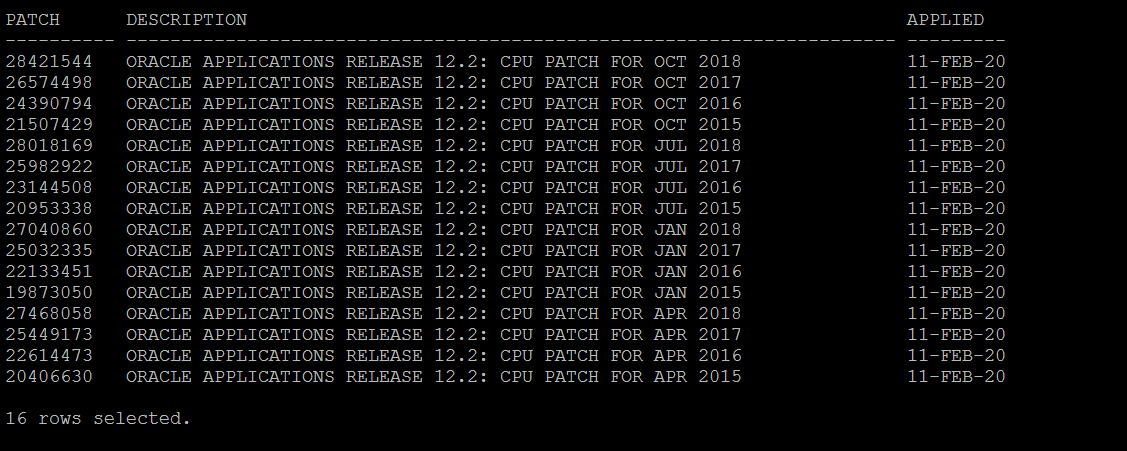
How to find EBS CPU Patch Level in R12.2 ?

How to find EBS CPU Patch Level in R12.2 
For 12.2 use the below script. 

  
set linesize 141
set pagesize 100;
col "Patch" format A10;
col "Description" format A70;
select distinct bug_number Patch, decode(bug_number,
    '28421544','ORACLE APPLICATIONS RELEASE 12.2: CPU PATCH FOR OCT 2018',
    '28018169','ORACLE APPLICATIONS RELEASE 12.2: CPU PATCH FOR JUL 2018',
    '27468058','ORACLE APPLICATIONS RELEASE 12.2: CPU PATCH FOR APR 2018',
    '27040860','ORACLE APPLICATIONS RELEASE 12.2: CPU PATCH FOR JAN 2018',
    '26574498','ORACLE APPLICATIONS RELEASE 12.2: CPU PATCH FOR OCT 2017',
    '25982922','ORACLE APPLICATIONS RELEASE 12.2: CPU PATCH FOR JUL 2017',
    '25449173','ORACLE APPLICATIONS RELEASE 12.2: CPU PATCH FOR APR 2017',
    '25032335','ORACLE APPLICATIONS RELEASE 12.2: CPU PATCH FOR JAN 2017',
    '24390794','ORACLE APPLICATIONS RELEASE 12.2: CPU PATCH FOR OCT 2016',
    '23144508','ORACLE APPLICATIONS RELEASE 12.2: CPU PATCH FOR JUL 2016',
    '22614473','ORACLE APPLICATIONS RELEASE 12.2: CPU PATCH FOR APR 2016',
    '22133451','ORACLE APPLICATIONS RELEASE 12.2: CPU PATCH FOR JAN 2016',
    '21507429','ORACLE APPLICATIONS RELEASE 12.2: CPU PATCH FOR OCT 2015',
    '20953338','ORACLE APPLICATIONS RELEASE 12.2: CPU PATCH FOR JUL 2015',
    '20406630','ORACLE APPLICATIONS RELEASE 12.2: CPU PATCH FOR APR 2015',
    '19873050','ORACLE APPLICATIONS RELEASE 12.2: CPU PATCH FOR JAN 2015') Description,
     CREATION_DATE Applied
from ad_bugs
where bug_number in
('28421544','28018169','27468058','27040860','26574498','25982922','25449173','25032335','24390794','23144508','22614473','22133451','21507429','20953338','20406630','19873050') order by Description desc;

output
--------


Wednesday, January 22, 2020

Oracle EBSR12 Application PATCHING

EBS R12 APPLICATION PATCHING AGENDA

A) Identify code level checker

B)  DOWNLOAD LATEST PATCH 17537119

C)  ETCC CODE LEVEL CHECKER (ETCC)


D) EBS R12 DIRECTORY STRUCTURE

E) PATCH INVENTORY COMMANDS

F) APPLICATION TIER TECHNOLOGY UPDATES

G) APPLICATION TIER TECHNOLOGY UPDATES (FMW)

H) APPLICATION TIER TECHNOLOGY UPDATES (OHS)

I) H) APPLICATION TIER TECHNOLOGY UPDATES (WEBLOGIC)


MOS Doc ID 1355068.1

Friday, November 8, 2019

R12 PATCHING TECHNOLOGY COMPONENTS

Oracle E-Business Suite 12.2 Patching Technology Components Guide
 (Doc ID 1355068.1)
  • Oracle E-Business Suite Release 12.2 utilizes multiple technology components.
  • Each component has its own Oracle Home, which can be patched individually.
Article describes the technology patching tools and how are they used in EBS R12 (Release 12.2)

Patching Oracle E-Business Suite Release 12.2 Technology Components

Oracle Homes

Oracle E-Business Suite Release 12.2 uses the following Oracle Homes:

·         Oracle Fusion Middleware

    • Oracle WebLogic Server (WLS) 10.3.6
    • OHS (WebTier) 11.1.1 and Oracle Common (Common Modules)

·         Application Server (OracleAS)

    • Forms and Reports 10.1.2
·         Oracle Database
    • Oracle Database Server 11.2 or 12.0
Note: Oracle E-Business Suite Release 12.2 uses multiple Oracle Homes to accommodate the various technology components. When applying a patch, you must ensure the environment is set to point to the correct Oracle Home.

Application EBS Technology Patching Cycle: Fusion Middleware

Application tier technology patches are applied to the patch file system using a native patching tool such as OPatch or SmartUpdate, and the changes are then propagated to the run file system as part of an Online Patching cycle
The following is an overview of the process to follow when applying a technology patch within Oracle E-Business Suite**.
Note: EBS_ROOT is the base directory of your Oracle E-Business Suite Release 12.2 installation.

  1. Download any required technology patches and unzip them into the $NE_BASE/EBSapps/patch directory.
  2. Prepare the system for patching:
$ source <EBS_ROOT>/EBSapps.env3 run
$ adop phase=prepare
  1. Prepare to apply technology patches to the Oracle Home on the patch file system:
$ source <EBS_ROOT>/EBSapps.env3 patch
Refer to Table 1 below for details about applying technology patches application on the application tier.
  1. Optionally, apply any Oracle E-Business Suite patches planned for this patching cycle:
$ adop phase=apply patches=<patch_list>
  1. After all patches have been successfully applied, complete the patching cycle:
$ adop phase=finalize
$ adop phase=cutover
$ source <EBS_ROOT>EBSapps.env3 run
$ adop phase=cleanup
  1. Synchronize the technology level between patch and run file systems:
$ adop phase=fs_clone

Note: The above overview does not apply if patches are being applied in hotpatch or downtime mode, where technology patches are applied directly to the run file system outside an online patching cycle. If you are installing or upgrading to Release 12.2, you may have been referred to this document from My Oracle Support Knowledge Document 1617461.1 Applying the Latest AD and TXK Release Update Packs to Oracle E-Business Suite Release 12.2. If you are following Path A of that document, note that it uses hot patching, so you will not use the patching cycle shown above until later in the installation or upgrade process.

Table 1 - Fusion Middleware Oracle Home


Oracle Home
Patch Installation Instructions
Inventory Command for Patch Installation Verification
Patch De-installation Instructions
Notes
WebLogic Server
  1. Review the patch Readme
  2. Follow the Readme instructions, for example by running the commands:
$ cd $FMW_HOME/utils/bsu
$ bsu.sh3
-prod_dir=<path>/FMW_Home/wlserver_10.3
-patchlist=<patchID1>
-verbose -install
  • Run the commands:
$ cd $FMW_HOME/utils/bsu
$ bsu.sh3 -report
-bea_home=<pathto>/FMW_Home -output_format=text
  • Follow the patch Readme instructions, for example by running the command:
$ ./bsu.sh3 -remove -patchlist=<patchID1> -prod_dir=<path>/FMW_Home/wlserver_10.3 -verbose


Web Tier and Utilities (OHS)
  1. Review the patch Readme
  2. Set ORACLE_HOME to the required FMW Oracle Home.2
  3. Include $ORACLE_HOME/OPatch in the PATH
  4. Change directory to the patch directory
  5. Follow the Readme instructions, for example by running the command:
    $ opatch apply
  1. Set ORACLE_HOME to the required FMW Oracle Home.2
    For example:
$ export ORACLE_HOME =
$IAS_ORACLE_HOME
  1. Include $ORACLE_HOME/OPatch in the PATH
  2. Run the command:
$ opatch lsinventory
  • Follow the Readme instructions, for example by running the command:
$ opatch rollback -id <patchnumber>
  • More information on OPatch is available in My Oracle Support Knowledge Document 293369.1.
Oracle Fusion Middleware Common
  1. Review the patch Readme
  2. Set ORACLE_HOME to the required FMW Oracle Home.2
  3. Include $ORACLE_HOME/OPatch in the PATH
  4. Change directory to the patch directory
  5. Follow the Readme instructions, for example by running the command:
$ opatch apply
  1. Set ORACLE_HOME to the required FMW Oracle Home.2
    For example:
$ export ORACLE_HOME =
$FMW_HOME/oracle_common
  1. Include $ORACLE_HOME/OPatch in the PATH.
  2. Run the command:
$ opatch lsinventory
  • Follow the Readme instructions, for example by running the command:
$ opatch rollback -id <patchnumber>
  • More information on OPatch is available in My Oracle Support Knowledge Document 293369.1.

Forms and Reports 10.1.2

  1. Review the patch Readme
  2. Source the Application Server Oracle Home Environment
  3. Include $ORACLE_HOME/OPatch in the PATH
  4. Change directory to the patch directory
  5. Follow the Readme instructions, for example by running the command:
$ opatch apply
  1. Source the OracleAS Oracle Home environment.
  2. Include $ORACLE_HOME/OPatch in the PATH.
  3. Run the command:
$ opatch lsinventory
  • Follow the Readme instructions, for example by running the command:
$ opatch rollback -id <patchnumber>
  • More information on OPatch is available in My Oracle Support Knowledge Document 293369.1.
  • Additional actions specific to E-Business Suite may be necessary after patch install or rollback. Refer to My Oracle Support Knowledge:Document 437878.1 Steps 4.1 and 4.2.
1 PatchID is a combination of letters and numbers. As a general rule the PatchID is the name of the jar file without the .jar extension.
2 
SetOracleCommon.env and SetWebtier.env are provided within the $FMW_HOME directory scripts that set the Oracle Home for patching purposes.
On Windows, command (.cmd) scripts such 
EBSapps.cmd and bsu.cmd are the equivalent of the shell scripts mentioned for UNIX platforms.
Note: You may verify the installation of any WebLogic Patch by examing the inventory output from:

$ cd $FMW_HOME/utils/bsu
$ bsu.sh -report


Database Oracle Home


The Database Oracle Home is not a part of the the online patching process within Oracle E-Business Suite 12.2. We strongly recommend applying required database patches as soon as possible, or you may experience issues.
If you plan to combine applying the required database patches as part of your next online patching cycle, you can apply them after the cutover phase of that cycle:

On application tier primary node:
$source <INSTALL_BASE>/EBSapps.env4 run
$ adop phase=prepare
$ adop phase=apply patches=1111,2222
$ adop phase=finalize
$ adop phase=cutover mt_restart=no

On database node:
$ source <INSTALL_BASE>/<sid_machine>.env
$ $ORACLE_
HOME/appsutil/scripts/<sid_machine>/addbctl.sh stop
$ $ORACLE_HOME/OPatch/opatch apply <Database Patch >
$ $ORACLE_HOME/appsutil/scripts/<sid_machine>/addbctl.sh start


On application tier primary node:


$ source <INSTALL_BASE>/EBSapps.env4 run
$ adstrtal.sh -mode=allnodes
$ adop phase=cleanup

Table 2 - Database Oracle Home


Oracle Home
Patch Installation Instructions
Inventory Command for Patch Installation Verification
Patch De-installation Instructions
Notes
Database (RDBMS)
  1. Review the patch Readme
  2. Source the Database Oracle Home environment
  3. Include $ORACLE_HOME/OPatch in the PATH
  4. Change directory to the patch directory
  5. Follow the Readme instructions, for example by running the command:
$ opatch apply
  1. Source the Database Oracle Home environment
  2. Include $ORACLE_HOME/OPatch in the PATH
  3. Run the command:
$ opatch lsinventory
  • Follow the Readme instructions, for example by running the command:
$ opatch rollback -id <patchnumber>
  • More information on OPatch is available in My Oracle Support Knowledge Document 293369.1.