Friday, June 26, 2020

RMAN-08137: WARNING: archived log not deleted, needed for standby

RMAN-08137: WARNING: archived log not deleted, needed for standby

Recently I met with an Oracle error 
"RMAN-08137: WARNING: archived log not deleted, needed for standby or upstream capture process" while deleting the archived logs through RMAN prompt.
I simulated the same on my test machine.

Note. I had configured standby for my primary database but not the upstream.

Followings are the excerpts from the RMAN output.


RMAN> delete noprompt archivelog all;

allocated channel: ORA_DISK_1
channel ORA_DISK_1: SID=3012 device type=DISK
allocated channel: ORA_DISK_2
channel ORA_DISK_2: SID=1011 device type=DISK
allocated channel: ORA_DISK_3
channel ORA_DISK_3: SID=2030 device type=DISK
allocated channel: ORA_DISK_4
channel ORA_DISK_4: SID=2028 device type=DISK
allocated channel: ORA_DISK_5
channel ORA_DISK_5: SID=3011 device type=DISK
RMAN-08137: WARNING: archived log not deleted, needed for standby or upstream capture process

I could delete those archivelogs using "force" option as well.
RMAN > delete noprompt force archivelog all;

But I dont want to do the same as those archivelogs have not shipped yet to the standby server.
So I changed the rman configuration to do the same.

RMAN> show all;
CONFIGURE ARCHIVELOG DELETION POLICY TO NONE; # default

RMAN> CONFIGURE ARCHIVELOG DELETION POLICY TO SHIPPED TO STANDBY;
new RMAN configuration parameters:
CONFIGURE ARCHIVELOG DELETION POLICY TO SHIPPED TO STANDBY;
new RMAN configuration parameters are successfully stored
RMAN-08591: WARNING: invalid archived log deletion policy

RMAN> show all;
CONFIGURE ARCHIVELOG DELETION POLICY TO SHIPPED TO STANDBY;

Now I was able to delete those archivelogs.

RMAN> delete noprompt archivelog all;

released channel: ORA_DISK_1
allocated channel: ORA_DISK_1
channel ORA_DISK_1: SID=147 device type=DISK

..........
..........

deleted archived log
.........
.........

RMAN> crosscheck archivelog all;

released channel: ORA_DISK_1
allocated channel: ORA_DISK_1
channel ORA_DISK_1: SID=147 device type=DISK
specification does not match any archived log in the repository

Once I deleted those logs, I changed the rman configuration by the default one.

RMAN> CONFIGURE ARCHIVELOG DELETION POLICY CLEAR;

old RMAN configuration parameters:
CONFIGURE ARCHIVELOG DELETION POLICY TO SHIPPED TO STANDBY;
RMAN configuration parameters are successfully reset to default value

Monday, June 15, 2020

Cursor Sharing

Cursor Sharing

Cursor sharing is an important component of Database System. 
It is mainly based on Hard and Soft parse mechanisms.
When the query is first executed, the optimizer generates a new execution plan and a cursor, storing sql information in the Shared Pool memory area (the RDBMS executes a hard-parse). 
When the same query will be executed again the plan is not more generated: the already evaluated plan stored in Shared Pool is used, saving time and resources 
(the RDBMS executes a soft-parse).
 In this second case, the Database System doesn’t need to create a new cursor because, thanks to cursor sharing, the DB re-uses the previous generated one.

The basic soft/hard parse mechanism and cursor sharing is explained in the following Diagram :-


Non รจ stato fornito nessun testo alternativo per questa immagine

Hard Parses can be largely reduced using Bind Variables.

Actually, Oracle differentiates between parent and child cursor stored in the Shared Pool area.

Every parsed SQL statement has a parent cursor and one or more child cursors. The parent cursor stores the text of the SQL statement. If the text of two statements is identical, then the statements share the same parent cursor. If the text is different, however, then the database creates a separate parent cursor.

Every parent cursor has one or more child cursors. A child cursor contains the execution plan, bind variables, metadata about objects referenced in the query, optimizer environment, and other information. In contrast to the parent cursor, the child cursor does not store the text of the SQL statement.

Oracle generates child cursors (linked to an unique parent cursor) for nearly 60 reasons. The optimizer decides whether to generate a cursor or not, for example, using cardinality feedbacks, that are sql execution statistics. In this way, for next sql executions, the Optimizer can make his choice evaluating more than one plan, without executing an actual Hard Parse. 

In this case we could say that the DB is executing an “Harder” Soft Parse:


This is very useful because can reduce cardinality impact on execution costs. The v$sql_shared_cursor view contains the reason why a certain cursor exists (and why it is not shared with existing child cursors). In fact, this view has more than 60 columns and each column identifies a specific reason why the cursor can’t be shared.

Bug 14176247: cursors issues using Adaptive Cursor Sharing with binds

The documented bug causes the creation of too much cursors and affects 12c release. 

As a Symptom - The bug noticed an huge concurrency in the database.This is How the OEM looks like - 


Oracle Cursor Sharing Bug in 12c Database (cursor: pin S wait on X) wait event

Oracle Cursor Sharing Bug


Bug 14176247 - Many child cursors using Adaptive Cursor Sharing with binds (due to BIND_EQUIV_FAILURE)


Symptoms:

Related To:


Description

 
A high number of child cursors may be produced with the same plan when
using Adaptive Cursor Sharing for SQL with binds in some cases.
 
Rediscovery Notes
 This bug may be suspected if all of the following are true:
  A cursor has a high VERSION_COUNT in V$SQLAREA
  The reason for not sharing shows as BIND_EQUIV_FAILURE in V$SQL_SHARED_CURSOR
  The query has multiple predicates with binds that are involved in 
   extended cursor sharing.  
  The are many selectivity ranges (in V$SQL_CS_SELECTIVITY), and they overlap. 

  Setting _optimizer_extended_cursor_sharing_rel = none avoids the problem
 
 In cases if high concurrency the issue may also show as 
  "cursor: pin S wait on X" waits against the problem cursor/s
 
Workaround
 Set _optimizer_extended_cursor_sharing_rel = none

Adaptive cursor sharing bug that is described on DOC ID 14176247.8 of MOS.


12.2 Cursor Mutex X Due To Sql Not Shared Because Of BIND_EQUIV_FAILURE

Bug 28794230  12.2 Cursor Mutex X Due To Sql Not Shared Because Of BIND_EQUIV_FAILURE


Symptoms:

Related To:


Description

Cursor leak with ACS(Adaptive Cursor Sharing) and CFB(Cardinality FeedBack) 
on short-running query and fix for Bug:23596611.
  
Rediscovery Notes
If a subsecond query with binds exhibits increasing child cursor count on
repeated executions on a release where the fix for Bug:23596611 exists and
disabling adaptive cursor sharing or statistics feedback prevents the cursor leak ,t
hen you may have encountered this bug.
 
You can see  BIND_EQUIV_FAILURE=Y in V$SQL_SHARED_CURSOR.
 
Workaround 

Several alternatives:
_optimizer_use_feedback=false
_optimizer_adaptive_cursor_sharing=false
_optimizer_extended_cursor_sharing_rel=none
_fix_control='23596611:OFF'  may also help in some cases

Alter system set _optimizer_use_feedback=false scope=spfile;
Alter system set _optimizer_adaptive_cursor_sharing=false scope=spfile;
Alter system set _optimizer_extended_cursor_sharing_rel=none scope=spfile;


Ref- 
(Doc ID 28794230.8)

Exception java.lang.UnsatisfiedLinkError: ../jre/1.4.2/lib/i386/libawt.so: libXp.so.6

"Exception java.lang.UnsatisfiedLinkError: ../jre/1.4.2/lib/i386/libawt.so: libXp.so.6: cannot open shared object file: No such file or directory occurred" on RHEL5/OEL5 for 10.2 x86 or x86_64 install (Doc ID 443617.1)


Getting error while installing (./runInstaller) 

Exception java.lang.UnsatisfiedLinkError: /tmp/OraInstall<time_stamp>/jre/1.4.2/lib/i386/libawt.so: libXp.so.6: cannot open shared object file: No such file or directory occurred..
java.lang.UnsatisfiedLinkError: /tmp/OraInstall<time_stamp>/jre/1.4.2/lib/i386/libawt.so: libXp.so.6: cannot open shared object file: No such file or directory
at java.lang.ClassLoader$NativeLibrary.load(Native Method)
at java.lang.ClassLoader.loadLibrary0(Unknown Source)
at java.lang.ClassLoader.loadLibrary(Unknown Source)
at java.lang.Runtime.loadLibrary0(Unknown Source)
at java.lang.System.loadLibrary(Unknown Source)
at sun.security.action.LoadLibraryAction.run(Unknown Source)
at java.security.AccessController.doPrivileged(Native Method)
at sun.awt.NativeLibLoader.loadLibraries(Unknown Source)
at sun.awt.DebugHelper.<clinit>(Unknown Source)
at java.awt.Component.<clinit>(Unknown Source)
at oracle.sysman.oii.oiif.oiifm.OiifmGraphicInterfaceManager.<init>(OiifmGraphicInterfaceManager.java:222)
at oracle.sysman.oii.oiic.OiicSessionInterfaceManager.createInterfaceManager(OiicSessionInterfaceManager.java:193)
at oracle.sysman.oii.oiic.OiicSessionInterfaceManager.getInterfaceManager(OiicSessionInterfaceManager.java:202)
at oracle.sysman.oii.oiic.OiicInstaller.getInterfaceManager(OiicInstaller.java:436)
at oracle.sysman.oii.oiic.OiicInstaller.runInstaller(OiicInstaller.java:926)
at oracle.sysman.oii.oiic.OiicInstaller.main(OiicInstaller.java:866)
Exception in thread "main" java.lang.NoClassDefFoundError
at oracle.sysman.oii.oiif.oiifm.OiifmGraphicInterfaceManager.<init>(OiifmGraphicInterfaceManager.java:222)
at oracle.sysman.oii.oiic.OiicSessionInterfaceManager.createInterfaceManager(OiicSessionInterfaceManager.java:193)
at oracle.sysman.oii.oiic.OiicSessionInterfaceManager.getInterfaceManager(OiicSessionInterfaceManager.java:202)
at oracle.sysman.oii.oiif.oiifm.OiifmAlert.<clinit>(OiifmAlert.java:151)
at oracle.sysman.oii.oiic.OiicInstaller.runInstaller(OiicInstaller.java:984)
at oracle.sysman.oii.oiic.OiicInstaller.main(OiicInstaller.java:866)

Cause

The  i386 (32bit) version of the libXp package is missing. The Oracle Universal Installer ( OUI  ) requires the file libXp.so.6 and this file is installed with the package libXp in RHEL 5 and OEL 5.

Issue the following to confirm the missing rpm:

% rpm -qa --queryformat "%{NAME}-%{VERSION}-%{RELEASE} (%{ARCH})\n" | grep libXp


SOLUTION

The package libXp was not installed need to install manually.


 Install the package libXp by the command:


rpm -ivh </path/to/>libXp.<version>.i386.rpm


 Confirm the installer now runs and displays:


 ./runInstaller


Friday, June 12, 2020

EBS WEBLOGIC SERVER ADMIN PORT AND URL in EBSR12

WEBLOGIC SERVER ADMIN PORT AND URL 

  • Check for the value 'WLS Admin Server Port'.

                grep -i s_wls_adminport $CONTEXTFILE


  • Check for 'listen-port' value of the 'AdminServer'

                grep -i AdminServer $CONTEXTFILE


  • Command for Console URL


echo "http://"$(cat $CONTEXT_FILE | grep s_webhost | cut -d '>' -f2 | cut -d '<' -f1)"."$(cat $CONTEXT_FILE | grep s_wls_admin_domain | cut -d '>' -f2 | cut -d '<' -f1)":"$(cat $CONTEXT_FILE | grep s_wls_adminport | cut -d '>' -f2 | cut -d '<' -f1)"/console"


Friday, April 17, 2020

CHECK ASM FREE SPACE

How to check Free space in ASM diskgroups

Connect to ASM instance.


QUERY 1

select name, state, total_mb, free_mb from v$asm_diskgroup;


NAME                           STATE         TOTAL_MB    FREE_MB
------------------------------ ----------- ---------- ----------
DATA01                         MOUNTED        4095968    1674748
RECO01                         MOUNTED        3071976    1993636
VOTE                           MOUNTED         153588     153288


QUERY2


SELECT name, type, ceil (total_mb/1024) TOTAL_GB , ceil (free_mb/1024) FREE_GB, required_mirror_free_mb,
ceil ((usable_file_mb)/1024) FROM V$ASM_DISKGROUP;


NAME                           TYPE     TOTAL_GB    FREE_GB REQUIRED_MIRROR_FREE_MB CEIL((USABLE_FILE_MB)/1024)
------------------------------ ------ ---------- ---------- ----------------------- ---------------------------
DATA01                         EXTERN       4000       1562                       0                        1562
RECO01                         EXTERN       3000       1948                       0                        1948
VOTE                               HIGH          150              150                         0                          50


QUERY 3
------------

SET LINESIZE 150 
SET PAGESIZE 9999 
SET VERIFY off
COLUMN group_name 
FORMAT a25 HEAD 'DISKGROUP_NAME' 
COLUMN state FORMAT a11 HEAD 'STATE' 
COLUMN type FORMAT a6 HEAD 'TYPE' 
COLUMN total_mb FORMAT 999,999,999 HEAD 'TOTAL SIZE(GB)' 
COLUMN free_mb FORMAT 999,999,999 HEAD 'FREE SIZE (GB)' 
COLUMN used_mb FORMAT 999,999,999 HEAD 'USED SIZE (GB)' 
COLUMN pct_used FORMAT 999.99 HEAD 'PERCENTAGE USED' 
 SELECT distinct name group_name , state state , type type , 
round(total_mb/1024) TOTAL_GB , round(free_mb/1024) free_gb , 
round((total_mb - free_mb) / 1024) used_gb , 
round((1- (free_mb / total_mb))*100, 2) pct_used from 
v$asm_diskgroup;

GROUP_NAME                     STATE       TYPE     TOTAL_GB    FREE_GB    USED_GB PERCENTAGE USED
------------------------------ ----------- ------ ---------- ---------- ---------- ---------------
DATA01                         MOUNTED     EXTERN       6500       1321       5178           79.67
RECO01                         MOUNTED     EXTERN       3000       2252        748           24.92
VOTE                           MOUNTED     HIGH          150        150          0             .20


Saturday, March 28, 2020

Shared Memory Calculations and Configurations

System defined limits for shared memory calculations and configurations.


QUESTION 1
===========

What is the maximum value of SHMMAX for a 32-bit (x86) Linux system?


ANSWER 1
============

Oracle Global Customer Support officially recommends a " maximum" for SHMMAX of just less than 4Gb, 4294967295.

The maximum size of a shared memory segment is limited by the size of the available user address space. On 32-bit systems, this is a theoretical 4GB. The maximum possible value for SHMMAX is just less than 4Gb, or 4294967295. Setting SHMMAX to 4GB exactly will give you 0 bytes as max, as this value is interpreted as a 32-bit number and it wraps around.


QUESTION 2
===========

What is the maximum value of SHMMAX for a 64-bit (x86-64) Linux system?

ANSWER 2
===========

Oracle Global Customer Support officially recommends a " maximum" for SHMMAX of "1/2 of physical RAM".


check  /etc/sysctl.conf and edit /etc/sysctl.conf

and ensure the following lines are present:
kernel.shmall = 18350080
kernel.shmmax = 75161927680
kernel.shmmni = 4096
kernel.sem = 250 32000 100 128

DBCA Error: ORA-27104: system-defined limits for shared memory was
misconfigured

 Fix: Increase kernel.shmmax & kernel.shmall based on your Server RAM. 
 Maximum SHMMAX values for Linux
x86 and x86-64

Example for x86_64 Server with 32GB RAM: (1/2 of physical RAM)

shmmax=34359738368 (=16*1024*1024*1024),
shmall=8388608 (=16*1024*1024*1024 / 4096) – 4096 is page size

restart or /sbin/sysctl.conf -p


 Oracle Metalink Note [ID 567506.1]


Wednesday, February 12, 2020

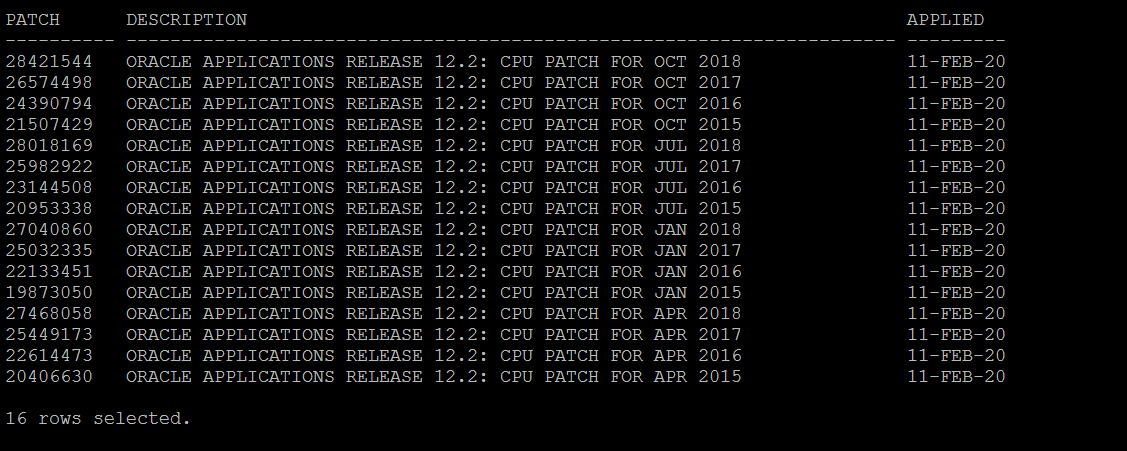
How to find EBS CPU Patch Level in R12.2 ?

How to find EBS CPU Patch Level in R12.2 
For 12.2 use the below script. 

  
set linesize 141
set pagesize 100;
col "Patch" format A10;
col "Description" format A70;
select distinct bug_number Patch, decode(bug_number,
    '28421544','ORACLE APPLICATIONS RELEASE 12.2: CPU PATCH FOR OCT 2018',
    '28018169','ORACLE APPLICATIONS RELEASE 12.2: CPU PATCH FOR JUL 2018',
    '27468058','ORACLE APPLICATIONS RELEASE 12.2: CPU PATCH FOR APR 2018',
    '27040860','ORACLE APPLICATIONS RELEASE 12.2: CPU PATCH FOR JAN 2018',
    '26574498','ORACLE APPLICATIONS RELEASE 12.2: CPU PATCH FOR OCT 2017',
    '25982922','ORACLE APPLICATIONS RELEASE 12.2: CPU PATCH FOR JUL 2017',
    '25449173','ORACLE APPLICATIONS RELEASE 12.2: CPU PATCH FOR APR 2017',
    '25032335','ORACLE APPLICATIONS RELEASE 12.2: CPU PATCH FOR JAN 2017',
    '24390794','ORACLE APPLICATIONS RELEASE 12.2: CPU PATCH FOR OCT 2016',
    '23144508','ORACLE APPLICATIONS RELEASE 12.2: CPU PATCH FOR JUL 2016',
    '22614473','ORACLE APPLICATIONS RELEASE 12.2: CPU PATCH FOR APR 2016',
    '22133451','ORACLE APPLICATIONS RELEASE 12.2: CPU PATCH FOR JAN 2016',
    '21507429','ORACLE APPLICATIONS RELEASE 12.2: CPU PATCH FOR OCT 2015',
    '20953338','ORACLE APPLICATIONS RELEASE 12.2: CPU PATCH FOR JUL 2015',
    '20406630','ORACLE APPLICATIONS RELEASE 12.2: CPU PATCH FOR APR 2015',
    '19873050','ORACLE APPLICATIONS RELEASE 12.2: CPU PATCH FOR JAN 2015') Description,
     CREATION_DATE Applied
from ad_bugs
where bug_number in
('28421544','28018169','27468058','27040860','26574498','25982922','25449173','25032335','24390794','23144508','22614473','22133451','21507429','20953338','20406630','19873050') order by Description desc;

output
--------


Tuesday, February 4, 2020

ORA-02266: unique/primary keys in table referenced by enabled foreign keys

ORA-02266: unique/primary keys in table referenced by enabled foreign keys


Error Message:

SQL> truncate table ABCDEF
truncate table ABCDEF
               *
ERROR at line 1:
ORA-02266: unique/primary keys in table referenced by enabled foreign keys

-- Find the referenced foreign key constraints.

Disable constraints script

SQL> select 'alter table '||a.owner||'.'||a.table_name||' disable constraint '||a.constraint_name||';'
   from all_constraints a, all_constraints b
  where a.constraint_type = 'R'
   and a.r_constraint_name = b.constraint_name
  and a.r_owner  = b.owner
  and b.table_name = '&TABLE_NAME';


Enable the foreign keys back

SQL> select 'alter table '||a.owner||'.'||a.table_name||' enable constraint '||a.constraint_name||';'
   from all_constraints a, all_constraints b
  where a.constraint_type = 'R'
   and a.r_constraint_name = b.constraint_name
   and a.r_owner  = b.owner
   and b.table_name = '&TABLE_NAME';