Thursday, January 22, 2026

Oracle E-Business Suite 12.2.14 Upgrade – Complete DBA Step-by-Step Guide

Oracle E-Business Suite 12.2.14 Upgrade – Complete DBA Step-by-Step Guide

 
Oracle has released Oracle E-Business Suite Release 12.2.14, the latest cumulative Release Update Pack (RUP) in the 12.2 family. This release brings together functional enhancements, framework improvements, security updates, and critical fixes into a single consolidated patch.

For organizations running mission-critical ERP workloads, upgrading to 12.2.14 is not just recommended — it is a strategic step toward stability, security, and long-term support readiness.

In this article, I will share a complete DBA-oriented upgrade guide, based on real-world production experience, covering planning, execution, validation, and best practices.


What is Oracle EBS 12.2.14?

Oracle EBS 12.2.14 is a suite-wide Release Update Pack that includes:

  • New functional enhancements

  • Statutory and regulatory updates

  • Framework and platform fixes

  • Performance and stability improvements

  • All cumulative fixes from previous 12.2 releases

This makes 12.2.14 a single clean baseline for customers planning long-term maintenance, database upgrades, or cloud migrations.


๐Ÿงญ Supported Upgrade Paths

✅ From EBS 12.2.x

You can directly apply the 12.2.14 RUP on top of your existing 12.2.x environment using Online Patching.

❌ From EBS 12.1.x

You must first upgrade to EBS 12.2 base release, then apply 12.2.14.


⚙️ Architecture Advantage – Online Patching

EBS 12.2 uses Edition-Based Redefinition (EBR) and ADOP Online Patching, allowing:

  • Patching while users remain connected

  • Minimal downtime during cutover

  • Safer rollback options

  • Parallel patch execution

This architecture makes large upgrades feasible even for 24x7 systems.


๐Ÿ›  Phase 1 – Pre-Upgrade Preparation (Most Critical Step)

๐Ÿ”น 1. Environment Baseline Check

Verify:

  • Current EBS version & patch level

  • Database version (19c strongly recommended)

  • OS certification (RHEL 7 / RHEL 8 supported)

  • Adequate disk space on APPL_TOP, FS1, FS2, DB


๐Ÿ”น 2. Apply Mandatory Pre-Req Patches

Before 12.2.14, ensure:

  • Latest AD Delta Patch

  • Latest TXK Delta Patch

  • Latest Online Patching support patches

Check with:

SELECT patch_level FROM fnd_product_installations WHERE application_id = 0;

๐Ÿ”น 3. Clean Online Patching Environment

Verify edition health:

SELECT edition_name, usable FROM dba_editions;

Cleanup old sessions:

adop cleanup

Confirm no failed sessions:

adop status

๐Ÿ”น 4. Backup Strategy (Mandatory)

Before starting:

  • Full RMAN database backup

  • Application tier backup

  • Snapshot / AMI backup in cloud

  • Save context files and config files


๐Ÿš€ Phase 2 – Apply 12.2.14 RUP Using ADOP

Step 1 – Prepare Phase

adop phase=prepare

Step 2 – Apply Phase

adop phase=apply patches=36026788 workers=8

Monitor:

adop status

Step 3 – Finalize Phase

adop phase=finalize

Step 4 – Cutover Phase

adop phase=cutover

Step 5 – Cleanup Phase

adop phase=cleanup

๐Ÿงช Phase 3 – Post-Upgrade Validation

๐Ÿ”น Technical Validation

  • Check application services

  • Verify forms and OAF pages

  • Confirm concurrent managers

  • Validate edition switching

Check invalid objects:

SELECT owner, object_name, status FROM dba_objects WHERE status='INVALID';

๐Ÿ”น Functional Validation

With business users:

  • Login and navigation

  • Core transactions

  • Interfaces and reports

  • Month-end / critical flows


⚠️ Common Issues Observed in Real Projects

From production experience:

๐Ÿ”น Edition Errors

  • ORA-38803 / ORA-38818
    Usually fixed by:

  • Cleaning failed adop sessions

  • Re-running finalize / cleanup


๐Ÿ”น Performance Issues After Upgrade

Fix by:

  • Re-gathering stats

  • Validating profile options

  • Reviewing JVM and heap settings


๐Ÿ”น Patch Conflicts

Avoid by:

  • Applying latest AD/TXK before RUP

  • Not mixing multiple one-off patches


๐Ÿ“ˆ Best Practices & Recommendations

✔ Always upgrade in DEV → TEST → PROD
✔ Keep a detailed upgrade tracker
✔ Involve functional users early
✔ Avoid patching during month-end
✔ Keep rollback strategy ready
✔ Document everything for audit & support


๐Ÿงญ Final Thoughts

Oracle EBS 12.2.14 is a stable, mature, and future-ready release. With Premier Support extended till 2036, staying on the latest 12.2 baseline ensures:

  • Strong security posture

  • Easier patching cycles

  • Better upgrade compatibility

  • Long-term Oracle support alignment

A well-planned upgrade not only improves system health but also simplifies future cloud and DR modernization initiatives.

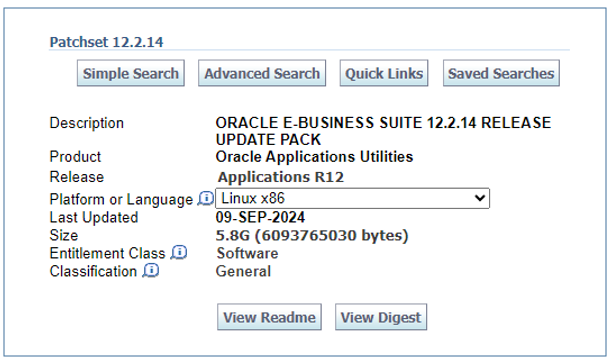
Oracle E-Business Suite 12.2.14

 We are pleased to announce that Oracle E-Business Suite 12.2.14 is now available. For details regarding the EBS 12.2.14, see the following:

The EBS 12.2.14 release update pack (RUP) is delivered on My Oracle Support as Patch 36026788  Instructions for downloading and applying this latest RUP on top of the EBS 12.2 codeline can be found here:

EBS 12.2.14

What Does Release 12.2.14 Include?

For a complete list of new features, refer to:

EBS Release 12.2.14 is cumulative. That means that as well as providing new updates for this release, it also includes updates that were originally made available as one-off patches for earlier 12.2 releases.

Common Questions and Answers About Upgrading

  • Q1: Is there a direct upgrade path from EBS 12.2.x to 12.2.14?
  • A1: Yes. Release 12.2.x customers can apply the EBS 12.2.14 RUP.  EBS 12.2.13 is an online patch, so it can be applied while an existing Release 12.2.x system is running.
  • Q2: Is there a direct upgrade path from Release 12.1 to Release 12.2.14?
  • A2: No. Release 12.1 customers must first upgrade to Release 12.2 before applying 12.2.14.

Additional References

๐Ÿ“Œ What Is Oracle EBS 12.2.14?

Oracle EBS 12.2.14 is a suite-wide Release Update Pack (RUP) that delivers new product and platform updates while also including all earlier improvements from the 12.2.x line. Like prior updates, 12.2.14 is available from My Oracle Support as Patch 36026788, with installation instructions contained in the official Readme (Doc ID 3011520.1).

This release is cumulative, meaning it rolls up:

  • New functional and technical enhancements

  • Framework and platform updates

  • Bug fixes and quality improvements

  • Statutory and regulatory updates

  • Prior one-off patches delivered since the last RUP


๐Ÿ†• What’s Included in 12.2.14

Oracle provides a release content document that lists all changes across the suite. While the full list is extensive, here are a few representative areas typically updated in this release:

๐Ÿ”น Functional Enhancements

  • Expanded reconciliation support in the Cash Management Command Center

  • Improved Lease Accounting processes

  • Enhancements in Order Management / Inventory / Costing and HCM modules
    These updates help streamline complex business processes and increase automation.

๐Ÿ”น Cumulative Fixes & Quality Improvements

Because this RUP consolidates prior one-off patches, it simplifies patch maintenance by reducing the number of individual patches needed to keep an EBS instance current.


๐Ÿ” Upgrade Paths and Applicability

Here’s how the upgrade path works:

From EBS 12.2.x: You can apply 12.2.14 directly on top of your existing 12.2.x installation.
From EBS 12.1.x: You must first upgrade to 12.2 before applying Release 12.2.14.

Like other 12.2 RUPs, 12.2.14 supports online patching using ADOP, allowing most patching tasks to occur while your system remains operational — a huge benefit for mission-critical environments.


๐Ÿ“ˆ Why This Release Matters

Here are the key benefits of upgrading to 12.2.14:

๐Ÿ” Continued Security & Support

By staying on the latest release, you maintain eligibility for important security updates and Oracle Premier Support. Oracle has extended Premier Support for EBS 12.2 through at least 2036, underscoring its long-term commitment to the platform.

๐Ÿ“Š Simplified Patch Maintenance

The cumulative nature of this RUP means fewer one-off patches and a cleaner maintenance baseline, making patching cycles easier to plan and execute.

⚙️ Broader Functionality

Beyond bug fixes, 12.2.14 includes enhancements to critical functional areas such as Cash Management, SCM, HCM modules, and others — helping organizations stay current with business needs.


๐Ÿ›  Planning Your Upgrade — Best Practices

Upgrading to 12.2.14 should be a well-orchestrated effort. Here are recommended steps:

๐Ÿ“Œ Preparation

  • Confirm your current EBS version and patch level

  • Review the 12.2.14 Readme and Release Content Document (RCD)

  • Verify hardware, OS, and database compatibility

๐Ÿ“Œ Testing and Validation

  • Apply the RUP first in a development or test environment

  • Validate all customizations, integrations, reports, and workflows

  • Conduct performance tests and functional regression tests

๐Ÿ“Œ Backup & Rollback

  • Take a full database backup before starting the upgrade

  • Take application tier backups or clone environments where feasible

  • Document rollback procedures in case of issues


๐Ÿ“Œ Final Thoughts

Oracle E-Business Suite 12.2.14 reinforces the continuous innovation strategy built into the 12.2 architecture. It provides a robust, cumulative upgrade path while improving system quality and offering useful enhancements across functional areas. Whether you’re finishing up an earlier 12.2 upgrade or planning your next maintenance window, this release should be high on your priority list for 2025.

If you need help planning your upgrade — from pre-upgrade analysis to post-patch validation — feel free to ask!


Oracle E-Business Suite 12.2.13 Now Available – What DBAs and EBS Administrators Should Know


Oracle E-Business Suite 12.2.13 Now Available – What DBAs and EBS Administrators Should Know

Oracle has officially announced the availability of Oracle E-Business Suite (EBS) Release 12.2.13, the latest Release Update Pack (RUP) in the 12.2 family. This release continues Oracle’s strategy of delivering incremental functional enhancements, statutory updates, performance improvements, and critical fixes while maintaining the stability of the EBS platform.

For organizations running EBS 12.2.x, this release is an important milestone and a recommended step toward keeping the environment secure, compliant, and fully supported.

In this article, we’ll walk through what’s new in 12.2.13, why it matters, upgrade considerations, and key DBA checkpoints before planning your next upgrade.


๐Ÿ” What is Oracle EBS 12.2.13?

Oracle EBS 12.2.13 is a suite-wide Release Update Pack (RUP) that bundles:

  • Functional enhancements

  • Legislative and statutory updates

  • Performance and stability fixes

  • Security patches and framework improvements

Being a cumulative release, 12.2.13 also includes all improvements delivered in previous 12.2.x releases. This makes it a single, consolidated update path for customers who want to stay current without applying multiple scattered patches.


๐Ÿ“ฆ Key Highlights of Release 12.2.13

1️⃣ Functional and Industry Enhancements

Oracle continues to invest in multiple functional areas across Financials, SCM, Manufacturing, HRMS, and Projects. Many country-specific and industry-specific enhancements are delivered through this release.

2️⃣ Performance and Stability Improvements

Several framework and application layer optimizations improve:

  • Form and OAF performance

  • Concurrent processing stability

  • Online patching reliability

  • Reduced patch conflicts

These changes directly benefit production environments running high workloads.

3️⃣ Security Updates

Security remains a strong focus. This release includes:

  • Updated security profiles

  • Framework hardening

  • Compatibility with the latest CPU and OJVM patches

This is critical for organizations with compliance and audit requirements.

4️⃣ Regulatory and Statutory Compliance

Many country-specific legal and statutory updates are included, helping customers remain compliant with tax, payroll, reporting, and accounting regulations.


๐Ÿ”„ Upgrade and Applicability

Who Can Apply 12.2.13?

  • ✔️ Customers already on EBS 12.2.x can directly apply the 12.2.13 RUP

  • ❌ Customers on EBS 12.1.x must first upgrade to 12.2 before moving to 12.2.13

The patch is delivered as a single consolidated RUP available on My Oracle Support.


⚙️ Online Patching Advantage

One of the biggest strengths of the 12.2 architecture is Online Patching (ADOP).

With 12.2.13:

  • Most patching activities can be done while users remain connected

  • Downtime is limited mainly to the final cutover phase

  • Business disruption is significantly reduced

This is a major advantage for enterprises running 24x7 mission-critical systems.


๐Ÿ›  Pre-Upgrade Planning – DBA Checklist

Before applying 12.2.13, DBAs and EBS administrators should carefully prepare the environment.

✅ Environment Readiness

  • Confirm current EBS version and patch level

  • Validate database version compatibility (19c recommended)

  • Check OS certification and kernel levels

✅ Technical Preparations

  • Apply latest AD and TXK Delta patches

  • Ensure Online Patching cycles are clean (no failed adop sessions)

  • Validate edition status using DBA_EDITIONS

  • Clean up obsolete patch sessions using adop cleanup

✅ Testing Strategy

  • Always apply first in DEV / TEST

  • Validate:

    • Custom forms and OAF pages

    • Interfaces and integrations

    • Reports and workflows

  • Perform functional regression testing with business users

✅ Backup & Rollback

  • Full database backup before patching

  • Application tier backup

  • Snapshot / AMI backup in cloud environments


๐Ÿ“ˆ Why You Should Consider Upgrading to 12.2.13

Staying on an older 12.2 release increases operational risk over time. Upgrading to 12.2.13 offers:

  • ๐Ÿ” Improved security posture

  • ⚙️ Better patching stability

  • ๐Ÿ“Š Enhanced performance

  • ๐Ÿ“œ Continued statutory compliance

  • ๐Ÿ›ก Long-term Oracle support alignment

For organizations planning future DB upgrades, cloud migrations, or DR modernization, being on the latest EBS RUP simplifies long-term maintenance.


๐Ÿงญ My Recommendation as an EBS DBA

From a DBA and operations perspective:

  • 12.2.13 is a mature, stable release

  • Highly recommended if you are:

    • On early 12.2 versions

    • Facing frequent patch conflicts

    • Planning 19c upgrades or cloud moves

    • Tight on security and audit controls

A well-planned upgrade with proper testing can significantly improve system reliability and patching efficiency going forward.


๐Ÿ“Œ Final Thoughts

Oracle E-Business Suite 12.2.13 reflects Oracle’s continued commitment to the EBS platform. With strong investments in stability, security, and compliance, this release is an important step for enterprises looking to keep their ERP systems modern, secure, and supportable.

If you’re running EBS in production today and haven’t evaluated your upgrade roadmap recently, now is the right time to plan your move to 12.2.13.


Reference 

 https://blogs.oracle.com/ebstech/oracle-ebusiness-suite-12213-now-available

Tuesday, January 20, 2026

Fixing ORA‑38803 “Edition is Unusable” After Applying AD/TXK 15 in Oracle E‑Business Suite R12.2

 After applying AD/TXK 15, ad_zd.grant_privs is failing:

EBS R12.2: ORA-38803: edition is unusable

Description
AD_ZD.grant_privs routine should not be trying to access unusable editions as these are not accessible and maintained by the DB.

This fix also includes the enhancement to warn the user if actualize_all did not actualize_all objects in the patch edition.


SQL> exec ad_zd.grant_privs('SELECT','MTL_SYSTEM_ITEMS_VL','<schema/role name>');
BEGIN ad_zd.grant_privs('SELECT','MTL_SYSTEM_ITEMS_VL','<schema/role name>'); END;

*
ERROR at line 1:
ORA-38803: edition is unusable
ORA-06512: at "APPS.AD_ZD", line 1382
ORA-06512: at "SYS.DBMS_SQL", line 1177
ORA-06512: at "APPS.AD_ZD", line 1365
ORA-06512: at line 1

Solution


Please check the versions of ADZDXS.pls and ADZDXB.pls. If they are lower than 120.25.1202000.24 and 120.52.12020000.100, respectively, please perform the following steps:


1. Download and review the readme and pre-requisites for patch 36303698.

2. Ensure that you have taken a backup of your system before applying the recommended patch.

3. Apply the patch in a test environment.

4. Confirm the following file versions:

ADZDXS.pls should be 120.25.12020000.24 or higher

ADZDXB.pls should be 120.52.12020000.100 or above

You can use the commands like the following:

strings -a $AD_TOP/patch/115/sql/ADZDXS.pls | grep $Header

strings -a $AD_TOP/patch/115/sql/ADZDXB.pls | grep $Header


5. Retest the issue.

6. Migrate the solution as appropriate to other environments.

Cause

The issue was caused by upgrading to AD/TXK 15.

A higher version of ADZDXS.pls is required.


References

  • MOS Doc ID 3030872.1 – After Applying AD/TXK Delta 15, AD_ZD.GRANT_PRIVS Fails With ORA‑38803
  • Oracle E‑Business Suite Online Patching Guide
  • AD/TXK 15 Patch Documentation

CONCLUSION


If you encounter ORA‑38803: edition is unusable after applying AD/TXK 15, the root cause is typically outdated AD_ZD code files.

Applying Patch 36303698 and ensuring the correct versions of ADZDXS.pls and ADZDXB.pls will resolve the issue.


----

SQL>

 Set linesize 200 pagesize 30

col codelevel for a20

select abbreviation, codelevel FROM AD_TRACKABLE_ENTITIES WHERE abbreviation in ('txk','ad');SQL> SQL> SQL>


ABBREVIATION                   CODELEVEL

------------------------------ --------------------

ad                             C.15

txk                            C.15


Please check the versions of ADZDXS.pls and ADZDXB.pls. If they are lower than 120.25.1202000.24 

and 120.52.12020000.100, respectively, please perform the following steps:


[applmgr@hostname  IHFNAPP]$ strings -a $AD_TOP/patch/115/sql/ADZDXS.pls | grep -i Header

/* $Header: ADZDXS.pls 120.25.12020000.23 2022/01/19 05:19:39 jwsmith ship $ */


[applmgr@hostname IHFNAPP]$ strings -a $AD_TOP/patch/115/sql/ADZDXB.pls | grep Header

/* $Header: ADZDXB.pls 120.52.12020000.98 2023/06/13 19:39:09 jwsmith ship $ */


Under APPS user


[applmgr@hostname sql]$ ls -tlr

total 60

-rwxr-xr-x. 1 applmgr dba  3790 Jan  1  2002 ADZDXS.pls

-rwxr-xr-x. 1 applmgr dba 56102 Jan  1  2002 ADZDXB.pls

[applmgr@hostname sql]$ sqlplus apps/xxxxxxxx


SQL*Plus: Release 10.1.0.5.0 - Production on Tue Jan 20 16:29:13 2026


Copyright (c) 1982, 2005, Oracle.  All rights reserved.


Connected to:

Oracle Database 19c Enterprise Edition Release 19.0.0.0.0 - Production


SQL> @ADZDXS.pls

Package created.

Commit complete.

Disconnected from Oracle Database 19c Enterprise Edition Release 19.0.0.0.0 - Production

[applmgr@hostname sql]$ sqlplus apps/xxxxx

SQL*Plus: Release 10.1.0.5.0 - Production on Tue Jan 20 16:29:30 2026

Copyright (c) 1982, 2005, Oracle.  All rights reserved.

Connected to:

Oracle Database 19c Enterprise Edition Release 19.0.0.0.0 - Production


SQL> @ADZDXB.pls

Package body created.

Commit complete.


OR APPLY PATCH

Apply patch [required]

Apply the patch with ADOP:
  adop phase=apply patches=36303698

Monday, October 6, 2025

EBS R12.2 + Database 19c — Change Hostname / Domain


EBS R12.2 + Database 19c — Change Hostname / Domain

Scope: 

Oracle E‑Business Suite R12.2.x with Database 19c, single‑node or two‑tier (Apps + DB on separate hosts). This step‑by‑step runbook consolidates guidance from Oracle Support Docs 1277556.1 (hostname change for EBS R12) and 759225.1 (change hostname/domain/IP for EBS instances).

Use cases: Hostname change, domain change (FQDN), IP change (with or without hostname change). Works for dev/test/prod; always test on a clone first.


0) High‑Level Plan

  1. Back up & prep

  2. OS change (hostname/domain, /etc/hosts)

  3. Database tier: refresh context → AutoConfig

  4. Apps tier: sync DB host → AutoConfig

  5. FND_NODES cleanup → AutoConfig (Apps)

  6. Restart & validate

  7. Post‑change (scripts, monitoring, integrations)

  8. (Optional) RAC/Data Guard considerations


1) Pre‑Requisites & Backups

  • Confirm current host and domain:

    hostname
    hostname -f
    hostname -d
    
  • Note current context files (DB & Apps tiers):

    echo $CONTEXT_FILE
    
  • Backups (choose as per your policy):

    • DB backup (RMAN or snapshot/AMI)

    • Apps tier file system (FS1/FS2), INST_TOP, and config directories

    • $ORACLE_HOME/network/admin (listener.ora, tnsnames.ora, sqlnet.ora)

    • Both context files (*.xml)

  • Change window: ensure outage window and approvers are aligned.

Tip (EBS R12.2): If DB tier’s $ORACLE_HOME/appsutil is old/missing, refresh it later with admkappsutil.pl from Apps tier (see §3.1).


2) OS‑Level Hostname/Domain/IP Change

  1. Update the system’s hostname and (if applicable) domain/FQDN. Typical on RHEL‑like systems:

    • /etc/hostname → set new hostname

    • /etc/hosts → map IP to new FQDN and short name

  2. Verify name resolution (getent hosts <new-fqdn>).

  3. Reboot or apply changes dynamically (per OS standard).

  4. Re‑check:

    hostname ; hostname -f ; hostname -d
    

If only the domain changes (same short host): still proceed with the same steps; EBS binds to the FQDN stored in context.


3) Database Tier

3.1 Stop DB and Prepare Appsutil (if needed)

  • Stop DB (srvctl or sqlplus, per your setup):

    srvctl stop database -d <DB_UNIQUE_NAME> -o immediate
    # or
    sqlplus / as sysdba <<EOF
    shutdown immediate;
    exit;
    EOF
    
  • (Optional but recommended) Refresh appsutil on DB tier if outdated:

    # On Apps tier (run edition)
    perl $AD_TOP/bin/admkappsutil.pl
    # Copy appsutil.zip to DB server’s $ORACLE_HOME and unzip there
    

3.2 Regenerate DB Context File with New Hostname/Domain

cd $ORACLE_HOME/appsutil/bin
perl adbldxml.pl dbname=<DB_SID> contextfile=$CONTEXT_FILE
  • Open the resulting XML and verify:

    • <s_dbhost> = new host

    • <s_domainname> = new domain

    • Network ports (listener) correct

3.3 Run AutoConfig on DB Tier

cd $ORACLE_HOME/appsutil/scripts/<CONTEXT_NAME>
./adautocfg.sh
  • This will regenerate listener.ora, tnsnames.ora, sqlnet.ora etc. with the new hostname/FQDN.

  • Validate the listener:

    lsnrctl status
    

4) Application Tier

4.1 Sync DB Host in Apps Context

  • Ensure the Apps tier context reflects the new DB host/domain:

    • Update s_dbhost, s_domainname, and any DB connect strings if present in Apps context.

4.2 Run AutoConfig on Apps Tier (Run Edition)

cd $ADMIN_SCRIPTS_HOME
./adautocfg.sh contextfile=$CONTEXT_FILE
  • This updates web/forms URLs, DB connect details, and other config to align with the new DB FQDN.

R12.2 note: Run AutoConfig on the run file system. AD utilities propagate to both run/patch contexts as needed.


5) FND_NODES Cleanup & Repopulate

Why: Old node/host entries in EBS can cause concurrent manager and service startup issues after a hostname/domain change.

  1. Connect as APPS:

    sqlplus apps/<apps_password>
    
  2. Inspect nodes:

    SELECT node_name, support_cp, support_web FROM fnd_nodes;
    
  3. Clean and repopulate:

    EXEC fnd_conc_clone.setup_clean;
    COMMIT;
    
  4. Run AutoConfig again on the Apps tier to repopulate nodes:

    $ADMIN_SCRIPTS_HOME/adautocfg.sh
    
  5. Verify:

    SELECT node_name FROM fnd_nodes;
    

6) Restart & Validate

  • Start services (Apps/DB in your standard order):

    # DB up (if not already)
    srvctl start database -d <DB_UNIQUE_NAME>
    
    # Apps services
    $ADMIN_SCRIPTS_HOME/adstrtal.sh <apps_user>/<apps_password>
    
  • Validate:

    • Access Login URL using the new hostname/domain

    • Concurrent Manager up & running

    • Workflow Mailer (if used) working

    • Sample report and form open

    • tnsping from Apps to DB shows the new FQDN

Profiles to sanity‑check (AutoConfig manages most, but verify):

  • APPS_FRAMEWORK_AGENT

  • APPS_SERVLET_AGENT

  • APPS_JSP_AGENT

  • ICX: Forms Launcher


7) Post‑Change Tasks

  • Update any custom scripts, integrations, and URLs referencing the old host/domain.

  • Update monitoring (OEM agents/targets, custom health checks, cron jobs).

  • For ETL/reporting servers, refresh connect strings.


8) Special Scenarios

8.1 RAC / Grid Infrastructure

  • If the DB is RAC:

    • Ensure the OS hostname change aligns with cluster naming. Host renames in RAC can be non‑trivial; coordinate with GI/CRS admin.

    • Update/verify srvctl configuration (database, instances, listeners):

      srvctl config database -d <DB_UNIQUE_NAME>
      srvctl config listener -l LISTENER
      srvctl config scan
      
    • If node names changed, follow GI procedures for node rename; then run AutoConfig on DB tier for each instance.

8.2 Data Guard / Standby

  • Update LOG_ARCHIVE_DEST_n, FAL_SERVER, FAL_CLIENT, and any tnsnames.ora entries on both primary and standby.

  • If using DG Broker:

    dgmgrl sys@<db_unique_name>
    EDIT DATABASE <db_unique_name> SET PROPERTY StaticConnectIdentifier = '... new host ...';
    
  • Test switchover/connectivity after change.

8.3 Only Domain Change

  • Same steps apply. The critical part is regenerating context and running AutoConfig on both tiers so FQDNs update correctly.

8.4 IP Address Change Only

  • Ensure /etc/hosts and DNS reflect the new IP; AutoConfig will still update local configs. Validate lsnrctl status and client connectivity.


9) Troubleshooting

  • Apps won’t start / node mismatch: Re‑run fnd_conc_clone.setup_clean and AutoConfig on Apps tier; confirm FND_NODES matches the new host.

  • Forms/URL still shows old host: Recheck Apps context for s_webentryhost, s_login_page, and profiles listed above; re‑run AutoConfig.

  • Listener uses old host: Re‑run DB AutoConfig; check $ORACLE_HOME/network/admin files; bounce listener.

  • tnsping fails from Apps to DB: Confirm new tnsnames.ora was propagated; check firewall/security groups for any hostname‑based rules.

  • R12.2 dual FS confusion: Ensure you ran AutoConfig on the run edition. If in doubt, run it again after confirming the correct $CONTEXT_FILE.


10) Rollback (High Level)

  • Revert OS hostname/domain to original.

  • Restore original context files (DB & Apps) from backup.

  • Re‑run AutoConfig on DB tier, then Apps tier.

  • Validate services and URLs.


11) Change Record / Checklist (copy into your tracker)

  • Window approved; stakeholders notified

  • Backups taken (DB, FS, configs)

  • OS hostname/domain/IP changed; DNS/hosts updated

  • DB context regenerated (adbldxml.pl)

  • DB AutoConfig completed (no errors)

  • Apps context updated with new DB host/domain

  • Apps AutoConfig completed (no errors)

  • fnd_conc_clone.setup_clean executed; Apps AutoConfig rerun

  • Services restarted; validation passed

  • Integrations/scripts/monitoring updated


References

  • My Oracle Support Doc ID 1277556.1 – How to change hostname for E‑Business Suite Release 12 (single node)

  • My Oracle Support Doc ID 759225.1 – How to change IP/Hostname/Domain for an EBS instance

This article paraphrases Oracle guidance for operational use. Always consult the official notes for environment‑specific prerequisites and the latest updates.

Thursday, October 2, 2025

Upgrade Oracle E-Business Suite R12.2.13 → R12.2.14


Step by Step Guide to Upgrade Oracle E-Business Suite R12.2.13 → R12.2.14

Hello Everyone ๐Ÿ‘‹,

In this blog, I am sharing my Apps DBA approach for upgrading Oracle E-Business Suite (EBS) from R12.2.13 to R12.2.14. This guide is simplified, practical, and includes Oracle Doc IDs, patch references, ETCC steps, and timelines so that both DBAs and Management can follow easily.


๐Ÿ”น Why Upgrade to R12.2.14?

  • Latest certified release of Oracle E-Business Suite.

  • Enhanced security fixes, stability improvements, and new features.

  • Keeps environment aligned with Oracle Support timelines.

  • Foundation for future EBS roadmap.


๐Ÿ“Œ Pre-Upgrade Checklist

  1. Database Version: Must be 19c (minimum 19.17 or latest RU).

  2. Operating System: RHEL 7 or 8 certified.

  3. Backups:

    • Take AMI backups (if on AWS EC2).

    • RMAN full DB backup + Apps tier filesystem backup.

  4. ETCC Check (Doc ID 1594274.1):

    • Download the latest ETCC.

    • Run on DB + App nodes.

    • Identify and apply missing patches.


๐Ÿ”น Step 1: Apply ETCC Patches

  • Download the latest ETCC (Oct 2024 release) from Oracle Support.

  • Apply missing Database and Middleware Technology Patches.

  • Re-run ETCC until environment is clean.

๐Ÿ“– Reference: Oracle Doc ID 1594274.1


๐Ÿ”น Step 2: Apply Latest AD and TXK Delta Release Update Packs

Before applying the R12.2.14 patch, ensure AD/TXK is up-to-date.

  • Apply the following patches:

    • R12.AD.C.Delta.16

    • R12.TXK.C.Delta.16

  • These packs include structural changes (e.g., EBS_SYSTEM schema) and upgrade utilities.

๐Ÿ“– Reference: Oracle Doc ID 1617461.1


๐Ÿ”น Step 3: Apply R12.2.14 Upgrade Patch

  • Download and apply R12.2.14 Release Update Pack (Patch 35570137).

  • Use adop in online mode for minimum downtime.

  • Post-Upgrade Steps:

    • Run AutoConfig on all tiers.

    • Compile invalid objects.

    • Validate Concurrent Managers.

๐Ÿ“– Reference: Oracle Doc ID 2484000.1


๐Ÿ”น Step 4: Post-Upgrade Validation

  • DBA Validation: Invalid objects, schema compilation, DB logs review.

  • Functional Testing:

    • Forms, Reports, Interfaces, and Customizations.

  • Testing Cycles:

    • Unit Testing

    • SIT/UAT

    • Regression Testing


๐Ÿ“Š Suggested Upgrade Timeline (POC/Test Run)

PhaseTaskDuration
Phase 1AMI + DB Backups0.5 Day
Phase 2ETCC Patching1 Day
Phase 3Apply AD/TXK Delta 161.5 Days
Phase 4Apply R12.2.14 Patch2 Days
Phase 5Post-Upgrade Validation & Handover1 Day
Total~6 Days

๐Ÿ“‚ Key Oracle References

  • Doc ID 1594274.1 – Using ETCC for DB + Middleware Patching

  • Doc ID 1617461.1 – Applying Latest AD and TXK Delta Packs

  • Doc ID 2484000.1 – Oracle EBS R12.2.14 Readme


๐Ÿ”น Flowchart – Upgrade Path

Here’s a simple visual flow you can insert into the blog for management clarity:

Start → Backup (AMI + RMAN) → ETCC Patches → AD/TXK Delta 16 → Apply R12.2.14 Patch → Post-Upgrade Validation → Handover

Start → Backup → ETCC → AD/TXK Delta 16 → R12.2.14 Patch → Validation 


✅ Conclusion

Upgrading to Oracle EBS R12.2.14 is not just a patching exercise — it’s a strategic move to keep your enterprise system secure, compliant, and future-ready.

My recommendation:

  • Always start with a POC in TEST environment.

  • Document backups, ETCC results, and validation steps.

  • Share timelines with Management before Production cutover.


Wednesday, September 10, 2025

ORA-00904: "REF": invalid identifier in Toad

 ORA-00904: "REF": invalid identifier in Toad


This issue arises because Toad tries to query auditing-related columns—including "REF"—that no longer exist in certain Oracle versions (notably 19c and above). As a result, the query breaks, and Toad throws the invalid identifier error.

Typically, you encounter this error in Toad, specifically when accessing the Script tab for a table or view—usually after pressing F4 to describe the object and then selecting the Script tab. At that point, you’ll likely see an error like:

ORA-00904: "REF": invalid identifier

To resolve it, follow these steps:

  1. Open Script Options.

  2. In the dialog that appears, make sure the Audit statements checkbox under the Related Objects section is unchecked.

Once that is unchecked, you’ll be able to view the script details for your table or view without encountering the error.


Quick Fix

Here’s how to get the script loading correctly:

  1. Press F4 on any table or view to open the object details.

  2. Switching to the Script tab will trigger the error.

  3. Go into Script Options (usually accessible via a button or menu when you're in the Script view).

  4. Find the Related Objects section.

  5. Uncheck the Audit statements option.

  6. Now revisit the Script tab—the details should load correctly, error-free.


Why This Works

By disabling the Audit statements option, you're preventing Toad from querying columns like "REF" that aren't supported anymore. Instead, Toad will run a more compatible query, allowing the script to display properly.


Wednesday, August 20, 2025

Oracle E-Business Suite (EBS) R12 – July 2025 Critical Patch Update (CPU), RU, and OJVM Patches

 Oracle E-Business Suite (EBS) R12 – July 2025 Critical Patch Update (CPU), RU, and OJVM Patches

Oracle has released the Critical Patch Update (CPU) for July 2025, which includes important security and stability updates for Oracle E-Business Suite (EBS) R12 environments. Staying current with these quarterly patches is essential to safeguard your applications, databases, and technology stack against vulnerabilities and performance issues.


๐Ÿ”น 1. Critical Patch Update (CPU) – July 2025

  • The CPU patch delivers fixes for security vulnerabilities identified across the Oracle product stack.

  • For EBS R12, these patches address vulnerabilities in Oracle Applications Technology Stack, Oracle Database, and WebLogic components.

  • Applying this patch ensures compliance with Oracle’s quarterly security standards.

๐Ÿ‘‰ Oracle CPU Advisory – July 2025


๐Ÿ”น 2. EBS Release Update (RU) Patches

  • Release Update (RU) patches are cumulative patches for EBS R12.2.x environments.

  • They include:

    • Security fixes

    • Performance improvements

    • Stability updates

  • The latest July 2025 RU can be applied on top of your existing R12.2.x environment to stay current with Oracle support requirements.

๐Ÿ“Œ Recommended: Test RU patches in a staging environment before applying to production.


๐Ÿ”น 3. Oracle Java Virtual Machine (OJVM) Patches

  • Oracle also released OJVM patches as part of July 2025 CPU.

  • These patches secure the Java component within the Oracle Database, which is required by EBS environments.

  • If OJVM is not patched, your EBS instance remains vulnerable even if CPU and RU are applied.


๐Ÿ”น 4. Best Practices for Applying July 2025 Patches

  1. Review Readme Documents

    • Always read the patch README for pre-requisites, compatibility, and post-install steps.

  2. Use Latest AD/TXK Delta

    • Ensure that you are on the latest AD and TXK delta levels before applying RU/CPU patches.

  3. Apply in Non-Production First

    • Test patches in cloned environments to validate impact on customizations, interfaces, and performance.

  4. Coordinate with Business Users

    • Schedule downtime with business users as patching requires appsTier & dbTier shutdowns.

  5. Run ETCC (EBS Technology Codelevel Checker)

    • Use ETCC to confirm required database and system patches before applying CPU/RU/OJVM.


๐Ÿ”น 5. References