Sunday, March 31, 2019

Versions of Oracle E Business Suite R12.2

To check the version of Each Technology stack components

Source the Oracle EBS Applications environment file as the owner of the application tier file system.

Oracle Forms and Reports - Product version


export ORACLE_HOME=`grep s_tools_oh $CONTEXT_FILE | sed 's/^.*s_tools_oh[^>.]*>[ ]*\([^<]*\)<.*/\1/g; s/ *$//g'`
${ORACLE_HOME}/bin/frmcmp_batch help=y |grep 'Forms 10.1 (Form Compiler) Version' |awk '{ print "Oracle Forms and Reports Product version : " $6 }'


Result -


Oracle Forms and Reports Product version : 10.1.2.3.0


Oracle Fusion Middleware (FMW) - Web Tier & oracle_common - Product version


export ORACLE_HOME=`grep s_weboh_oh $CONTEXT_FILE | sed 's/^.*s_weboh_oh[^>.]*>[ ]*\([^<]*\)<.*/\1/g; s/ *$//g'`
$ORACLE_HOME/OPatch/opatch lsinventory -detail | grep 'Oracle WebTier and Utilities CD' | awk NR==1{'print "FMW - WebTier & oracle_common Product version : " $6'}


FMW - WebTier & oracle_common Product version : 11.1.1.9.0


Oracle WebLogic Server (WLS) - Product version


export MYJAVA=`grep s_adjvaprg $CONTEXT_FILE | sed 's/^.*s_adjvaprg[^>.]*>[ ]*\([^<]*\)<.*/\1/g; s/ *$//g'`
${MYJAVA} -cp $FMW_HOME/patch_wls1036/profiles/default/sys_manifest_classpath/weblogic_patch.jar:$FMW_HOME/wlserver_10.3/server/lib/weblogic.jar weblogic.version |grep PSU |awk {'print "Oracle WebLogic Server (WLS) Product Version : " $3'}

Oracle WebLogic Server (WLS) Product Version : 10.3.6.0.170718


Execute below for Detailed versions of technology stack components (Forms, iAS, Framework, JDK, OJSP, Database, etc.):


On Application Tier


Source the Applications environment file as the owner of the application tier file system and run:

$ADPERLPRG $FND_TOP/patch/115/bin/TXKScript.pl \ -script=$FND_TOP/patch/115/bin/txkInventory.pl \ -txktop=$APPLTMP \ -contextfile=$CONTEXT_FILE \ -appspass=apps \ -outfile=$APPLTMP/Report_App_Inventory.html -reporttype=text


On Database Tier 

Source the Oracle Database environment file as the owner of the Database tier file system and run:

$ADPERLPRG $ORACLE_HOME/appsutil/bin/TXKScript.pl \
 -script=$ORACLE_HOME/appsutil/bin/txkInventory.pl -txktop=$ORACLE_HOME/appsutil/temp \
 -contextfile=$CONTEXT_FILE \
 -appspass=apps \
 -outfile=$ORACLE_HOME/appsutil/temp/Report_DB_Inventory.html -reporttype=text


Wednesday, February 20, 2019

How To Gather & Backup ASM/ACFS Metadata In A Formatted Manner version 10.1, 10.2, 11.1, 11.2, 12.1 and 12.2? (Doc ID 470211.1)

How To Gather & Backup ASM/ACFS Metadata In A Formatted Manner version

 (Doc ID 470211.1)


Script #1 (Generic ASM metadata):

-- Author: Esteban D. Bernal 
-- Property: Oracle Corporation

SPOOL ASM<#>_GENERIC_ASM_METADATA.html
-- ASM VERSIONS 10.1, 10.2, 11.1, 11.2, 12.1 & 12.2
SET MARKUP HTML ON
SET ECHO ON
SET PAGESIZE 200
ALTER SESSION SET NLS_DATE_FORMAT='DD-MON-YYYY HH24:MI:SS';
SELECT 'THIS ASM REPORT WAS GENERATED AT: ==)> ' , SYSDATE " " FROM DUAL;
SELECT 'INSTANCE NAME: ==)> ' , INSTANCE_NAME " " FROM V$INSTANCE;
SELECT 'HOSTNAME ASSOCIATED WITH THIS ASM INSTANCE: ==)> ' , MACHINE " " FROM V$SESSION WHERE PROGRAM LIKE '%SMON%';
SELECT * FROM V$INSTANCE;
SELECT * FROM GV$INSTANCE;
SELECT * FROM V$ASM_DISKGROUP;
SELECT GROUP_NUMBER, DISK_NUMBER, MOUNT_STATUS, HEADER_STATUS, MODE_STATUS, STATE, OS_MB, TOTAL_MB, FREE_MB, NAME, FAILGROUP, PATH
FROM V$ASM_DISK ORDER BY GROUP_NUMBER, FAILGROUP, DISK_NUMBER;
SELECT * FROM V$ASM_DISK ORDER BY GROUP_NUMBER,DISK_NUMBER;
SELECT SUBSTR(D.NAME,1,16) AS ASMDISK, D.MOUNT_STATUS, D.STATE,
DG.NAME AS DISKGROUP FROM V$ASM_DISKGROUP DG, V$ASM_DISK D
WHERE DG.GROUP_NUMBER = D.GROUP_NUMBER;
SELECT * FROM V$ASM_CLIENT;
SELECT DG.NAME AS DISKGROUP, SUBSTR(C.INSTANCE_NAME,1,12) AS INSTANCE,
SUBSTR(C.DB_NAME,1,12) AS DBNAME, SUBSTR(C.SOFTWARE_VERSION,1,12) AS SOFTWARE,
SUBSTR(C.COMPATIBLE_VERSION,1,12) AS COMPATIBLE
FROM V$ASM_DISKGROUP DG, V$ASM_CLIENT C
WHERE DG.GROUP_NUMBER = C.GROUP_NUMBER;
SELECT * FROM V$ASM_ATTRIBUTE;
SELECT * FROM V$ASM_OPERATION;
SELECT * FROM GV$ASM_OPERATION;
SELECT * FROM V$VERSION;
SELECT * FROM V$ASM_ACFSSNAPSHOTS;
SELECT * FROM V$ASM_ACFSVOLUMES;
SELECT * FROM V$ASM_FILESYSTEM;
SELECT * FROM V$ASM_VOLUME;
SELECT * FROM V$ASM_VOLUME_STAT;
SELECT * FROM V$ASM_USER;
SELECT * FROM V$ASM_USERGROUP;
SELECT * FROM V$ASM_USERGROUP_MEMBER;
SELECT * FROM V$ASM_DISK_IOSTAT;
SELECT * FROM V$ASM_DISK_STAT;
SELECT * FROM V$ASM_DISKGROUP_STAT;
SELECT * FROM V$ASM_TEMPLATE;
SHOW PARAMETER
SHOW SGA
!echo "SELECT '" > /tmp/GPNPTOOL.SQL 2> /dev/null
! $ORACLE_HOME/bin/gpnptool get >> /tmp/GPNPTOOL.SQL 2>> /dev/null
!echo "' FROM DUAL;" >> /tmp/GPNPTOOL.SQL 2>> /dev/null
! cat /tmp/GPNPTOOL.SQL
SET ECHO OFF
--DISPLAYS INFORMATION ABOUT THE CONTENTS OF THE SPFILE.
SELECT * FROM V$SPPARAMETER ORDER BY 2;
SELECT * FROM GV$SPPARAMETER ORDER BY 3;
--DISPLAYS INFORMATION ABOUT THE INITIALIZATION PARAMETERS THAT ARE CURRENTLY IN EFFECT IN THE INSTANCE.
SELECT * FROM V$SYSTEM_PARAMETER ORDER BY 2;
SELECT * FROM GV$SYSTEM_PARAMETER ORDER BY 3;
-- 12C ACFS VIEWS
SELECT * FROM V$ASM_ACFS_ENCRYPTION_INFO;
SELECT * FROM V$ASM_ACFSREPL;
SELECT * FROM V$ASM_ACFSREPLTAG;
SELECT * FROM V$ASM_ACFS_SEC_ADMIN;
SELECT * FROM V$ASM_ACFS_SEC_CMDRULE;
SELECT * FROM V$ASM_ACFS_SEC_REALM;
SELECT * FROM V$ASM_ACFS_SEC_REALM_FILTER;
SELECT * FROM V$ASM_ACFS_SEC_REALM_GROUP;
SELECT * FROM V$ASM_ACFS_SEC_REALM_USER;
SELECT * FROM V$ASM_ACFS_SEC_RULE;
SELECT * FROM V$ASM_ACFS_SEC_RULESET;
SELECT * FROM V$ASM_ACFS_SEC_RULESET_RULE;
SELECT * FROM V$ASM_ACFS_SECURITY_INFO;
SELECT * FROM V$ASM_ACFSTAG;
-- 12C ASM AUDIT VIEWS
SELECT * FROM V$ASM_AUDIT_CLEAN_EVENTS;
SELECT * FROM V$ASM_AUDIT_CLEANUP_JOBS;
SELECT * FROM V$ASM_AUDIT_CONFIG_PARAMS;
SELECT * FROM V$ASM_AUDIT_LAST_ARCH_TS;
-- 12C ASM ESTIMATE VIEW
SELECT * FROM V$ASM_ESTIMATE;
SELECT * FROM GV$ASM_ESTIMATE;
-- SPARSE Diskgroups VIEW
SELECT * FROM V$ASM_DISK_SPARSE;
SELECT * FROM V$ASM_DISKGROUP_SPARSE;
SPOOL OFF
EXIT


Script #2 (ASM Files & ASM Alias):


-- Author: Esteban D. Bernal
-- Property: Oracle Corporation

spool asm<#>_alias+files.html
-- ASM VERSIONS 10.1, 10.2, 11.1, 11.2, 12.1 & 12.2
SET MARKUP HTML ON
set echo on

set pagesize 200

COLUMN BYTES FORMAT  9999999999999999

alter session set nls_date_format='DD-MON-YYYY HH24:MI:SS';

select 'THIS ASM REPORT WAS GENERATED AT: ==)> ' , sysdate " "  from dual;


select 'HOSTNAME ASSOCIATED WITH THIS ASM INSTANCE: ==)> ' , MACHINE " " from v$session where program like '%SMON%';

select * from v$asm_alias;

select * from v$asm_file;

show parameter asm
show parameter cluster
show parameter instance_type
show parameter instance_name
show parameter spfile

show sga

spool off

exit

Script #3 (ASM Full Path Alias Directory):


-- Author: Esteban D. Bernal
-- Property: Oracle Corporation


spool asm<#>_full_path_alias_directory.html
-- ASM VERSIONS 10.1, 10.2, 11.1, 11.2, 12.1 & 12.2
SET MARKUP HTML ON
set echo on

set pagesize 200

alter session set nls_date_format='DD-MON-YYYY HH24:MI:SS';

select 'THIS ASM REPORT WAS GENERATED AT: ==)> ' , sysdate " "  from dual;


select 'HOSTNAME ASSOCIATED WITH THIS ASM INSTANCE: ==)> ' , MACHINE " " from v$session where program like '%SMON%';

SELECT CONCAT('+'||GNAME, SYS_CONNECT_BY_PATH(ANAME, '/'))
 FULL_PATH, SYSTEM_CREATED, ALIAS_DIRECTORY, FILE_TYPE
 FROM ( SELECT B.NAME GNAME, A.PARENT_INDEX PINDEX,
 A.NAME ANAME, A.REFERENCE_INDEX RINDEX,
 A.SYSTEM_CREATED, A.ALIAS_DIRECTORY,
 C.TYPE FILE_TYPE
 FROM V$ASM_ALIAS A, V$ASM_DISKGROUP B, V$ASM_FILE C
 WHERE A.GROUP_NUMBER = B.GROUP_NUMBER
 AND A.GROUP_NUMBER = C.GROUP_NUMBER(+)
 AND A.FILE_NUMBER = C.FILE_NUMBER(+)
 AND A.FILE_INCARNATION = C.INCARNATION(+)
 )
 START WITH (MOD(PINDEX, POWER(2, 24))) = 0
 CONNECT BY PRIOR RINDEX = PINDEX;


spool off

exit

Script #4 (ASMCMD commands to gather complementary metadata information):


################################################################################################
### Script Name:  asmcmd_script.sh                                                                                     ###   
################################################################################################
###  The next script generates additional ASM metadata information thru the ASMCMD interface ###
################################################################################################
###  Author: Esteban D. Bernal                                                               ###
################################################################################################
###  Property: Oracle Corporation                                                            ###
################################################################################################


echo "ASMCMD commands to gather complementary metadata information:"    > /tmp/asmcmd_script.out                2> /tmp/asmcmd_script.out
echo "=================================="       >> /tmp/asmcmd_script.out               2>> /tmp/asmcmd_script.out
echo "                                  "       >> /tmp/asmcmd_script.out               2>> /tmp/asmcmd_script.out
asmcmd -p ls -ls        >> /tmp/asmcmd_script.out               2>> /tmp/asmcmd_script.out
echo "=================================="       >> /tmp/asmcmd_script.out               2>> /tmp/asmcmd_script.out
echo "                                  "       >> /tmp/asmcmd_script.out               2>> /tmp/asmcmd_script.out
asmcmd -p lsattr        >> /tmp/asmcmd_script.out               2>> /tmp/asmcmd_script.out
echo "=================================="       >> /tmp/asmcmd_script.out               2>> /tmp/asmcmd_script.out
echo "                                  "       >> /tmp/asmcmd_script.out               2>> /tmp/asmcmd_script.out
asmcmd -p lsct  >> /tmp/asmcmd_script.out               2>> /tmp/asmcmd_script.out
echo "=================================="       >> /tmp/asmcmd_script.out               2>> /tmp/asmcmd_script.out
echo "                                  "       >> /tmp/asmcmd_script.out               2>> /tmp/asmcmd_script.out
asmcmd -p lsdg  >> /tmp/asmcmd_script.out               2>> /tmp/asmcmd_script.out
echo "=================================="       >> /tmp/asmcmd_script.out               2>> /tmp/asmcmd_script.out
echo "                                  "       >> /tmp/asmcmd_script.out               2>> /tmp/asmcmd_script.out
asmcmd -p lsdsk >> /tmp/asmcmd_script.out               2>> /tmp/asmcmd_script.out
echo "=================================="       >> /tmp/asmcmd_script.out               2>> /tmp/asmcmd_script.out
echo "                                  "       >> /tmp/asmcmd_script.out               2>> /tmp/asmcmd_script.out
asmcmd -p lsof  >> /tmp/asmcmd_script.out               2>> /tmp/asmcmd_script.out
echo "=================================="       >> /tmp/asmcmd_script.out               2>> /tmp/asmcmd_script.out
echo "                                  "       >> /tmp/asmcmd_script.out               2>> /tmp/asmcmd_script.out
asmcmd -p lsod  >> /tmp/asmcmd_script.out               2>> /tmp/asmcmd_script.out
echo "=================================="       >> /tmp/asmcmd_script.out               2>> /tmp/asmcmd_script.out
echo "                                  "       >> /tmp/asmcmd_script.out               2>> /tmp/asmcmd_script.out
asmcmd -p iostat        >> /tmp/asmcmd_script.out               2>> /tmp/asmcmd_script.out
echo "=================================="       >> /tmp/asmcmd_script.out               2>> /tmp/asmcmd_script.out
echo "                                  "       >> /tmp/asmcmd_script.out               2>> /tmp/asmcmd_script.out
asmcmd -p dsget >> /tmp/asmcmd_script.out               2>> /tmp/asmcmd_script.out
echo "=================================="       >> /tmp/asmcmd_script.out               2>> /tmp/asmcmd_script.out
echo "                                  "       >> /tmp/asmcmd_script.out               2>> /tmp/asmcmd_script.out
asmcmd -p lsop  >> /tmp/asmcmd_script.out               2>> /tmp/asmcmd_script.out
echo "=================================="       >> /tmp/asmcmd_script.out               2>> /tmp/asmcmd_script.out
echo "                                  "       >> /tmp/asmcmd_script.out               2>> /tmp/asmcmd_script.out
asmcmd -p spget >> /tmp/asmcmd_script.out               2>> /tmp/asmcmd_script.out
echo "=================================="       >> /tmp/asmcmd_script.out               2>> /tmp/asmcmd_script.out
echo "                                  "       >> /tmp/asmcmd_script.out               2>> /tmp/asmcmd_script.out
asmcmd -p  lstmpl       >> /tmp/asmcmd_script.out               2>> /tmp/asmcmd_script.out
echo "=================================="       >> /tmp/asmcmd_script.out               2>> /tmp/asmcmd_script.out
echo "                                  "       >> /tmp/asmcmd_script.out               2>> /tmp/asmcmd_script.out
asmcmd -p   lsusr       >> /tmp/asmcmd_script.out               2>> /tmp/asmcmd_script.out
echo "=================================="       >> /tmp/asmcmd_script.out               2>> /tmp/asmcmd_script.out
echo "                                  "       >> /tmp/asmcmd_script.out               2>> /tmp/asmcmd_script.out
asmcmd -p  lsgrp        >> /tmp/asmcmd_script.out               2>> /tmp/asmcmd_script.out
echo "=================================="       >> /tmp/asmcmd_script.out               2>> /tmp/asmcmd_script.out
echo "                                  "       >> /tmp/asmcmd_script.out               2>> /tmp/asmcmd_script.out
asmcmd -p   lspwusr     >> /tmp/asmcmd_script.out               2>> /tmp/asmcmd_script.out
echo "=================================="       >> /tmp/asmcmd_script.out               2>> /tmp/asmcmd_script.out
echo "                                  "       >> /tmp/asmcmd_script.out               2>> /tmp/asmcmd_script.out
asmcmd -p   volinfo -a  >> /tmp/asmcmd_script.out               2>> /tmp/asmcmd_script.out
echo "=================================="       >> /tmp/asmcmd_script.out               2>> /tmp/asmcmd_script.out
echo "                                  "       >> /tmp/asmcmd_script.out               2>> /tmp/asmcmd_script.out
##############################################################################################################

From 12.1.0.2, command "asmcmd -p volinfo -a" should be replaced to "asmcmd -p volinfo --all"

Execution Example:

[grid@asmlnx2 ~]$ . oraenv
ORACLE_SID = [+ASM] ? +ASM
The Oracle base remains unchanged with value /u01/app/grid
[grid@asmlnx2 ~]$
[grid@asmlnx2 ~]$ ./asmcmd_script.sh
[grid@asmlnx2 ~]$


Output file:

[grid@asmlnx2 ~]$ ls -l /tmp/asmcmd_script.out
-rw-r--r-- 1 grid oinstall 15873 Jun  6 11:03 /tmp/asmcmd_script.out

Wednesday, January 30, 2019

Ports Used in Oracle Apps EBS, portpool details

Ports Used in Oracle Apps EBS, portpool details


PORTPOOL taken in EBS R12 


Location of portpool.lst file: 

${INST_TOP}/admin/out/portpool.lst

Friday, January 25, 2019

Output Format in Postgressql

Alternate output format for psql

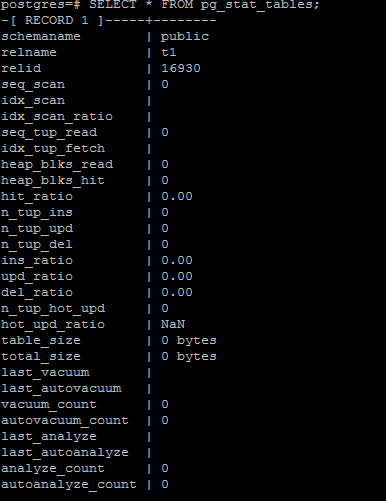
Its always difficult to read the output when we execute any query.
Example :- 


postgres=# SELECT * FROM pg_stat_tables;


Simple and Format way - 

\x on 


Thursday, January 24, 2019

POSTGRES DIRECTORY STRUCTURE

PostgreSQL DIRECTORY STRUCTURE

All the data needed for a database cluster is stored within the cluster's data directory, commonly referred to as PGDATA.


 pg_serial is used to track summarized information about committed serializable transactions which might still become part of a serialization failure rolling back some not-yet-committed transaction to protect data integrity.

The catalog cache is information from the system tables which describes the tables, indexes, views, etc. in the database. If you had to re-read that from the system tables each time, it would be slow. Even shared memory would be clumsy for that, so each backend process has its own cache of system catalog data for fast lookup. When anything changes, all backends are sent a signal to update or reload their cache data. When pages are read or written, they go through the OS cache, which is not directly under PostgreSQL control. The optimizer needs to keep track of a lot of information while it parses and plans a query, which is why that is shown. A plan has execution nodes, some of which may need to use memory; that is where work_mem comes in -- a sort or hash table (as examples) will try not to exceed work_mem *for that node*. It is significant that one query might use quite a few nodes which each allocate memory up to work_mem. But since most queries are simpler and might not use any work_mem allocations, people often do their calculations based on an expected maximum of one allocation per backend (i.e., per connection). But that could be off by quite a bit if all connections might be running queries with five nodes allocating memory.


PostgresSQL Architecture


PostgresSQL Architecture 


Postgresql Architecture 

When PostgreSQL starts-
The Postmaster starts first and allocates the shared memory
 It also accepts connections and spins off a backend for each new connection. So each backend (server process) gets its pointers to shared memory from the postmaster.
It is disastrous if the postmaster dies with backends still running, so we have it do as little as possible, so that there isn't as much which can crash it.
Postgres does have a pool of shared memory;
however, it does not have a library or dictionary cache stored in that memory (This means that statements do need to be parsed and planned every time they are entered. If parse/plan overhead is an issue, we suggest the use of prepared statements.
While Oracle is able to avoid the repeated parse/plan overhead, it must still do enough analysis of the query to determine whether the information is present in the library cache, which also consumes some time and CPU resources. The parser is quite lightweight, so we feel that the overhead of parsing the query each time is acceptable.
1.             Shared Memory:
----------------------
SHARED BUFFERS –
The biggest chunk of shared memory is shared_buffers.
When pages from a table or index are read from the OS, they are read into shared_buffers, and the backends reference the pages and their contents right there in shared memory.
An exception is temporary tables, where (since only the creating backend can reference the temp table) data is accessed in temp_buffer space as much as possible(temp_buffers is separate. It is not in shared memory). It's faster to access process-local memory like that because you don't need to worry about pinning or locking the data, since you are not sharing it.
WAL BUFFERS -- are for buffering data to be written to the WAL files.
CLOG BUFFERS -- are one of the SLRU-style buffers oriented toward circular "rings" of data, like which transaction numbers have been committed or rolled back.
LOCK SPACE -- Memory structures in shared memory are generally protected by "lightweight" locks, which are in shared memory. Tables are protected by "heavyweight" locks which are also in shared memory (and themselves protected by lightweight locks). Of course, lightweight locks are protected by spinlocks. It gets very complicated and fussy. :-)
OTHER BUFFERS -- are probably mostly SLRU buffers besides CLOG (which was the first user of the SLRU system). SLRU is good for data where you mostly want to use recently accessed data and then you are done with it relatively quickly.
The opposite of shared memory is process-local memory -- only the one process that allocates it can access it.
Each SLRU system has a separate subdirectory. Shared memory is memory that all of the backend server processes can directly access. To prevent chaos, access to shared memory must follow some rules which tends to make it a little slower, like locking areas of memory a process will be using. Process-local memory is allocated by one backend server process, and the other backend server processes can't see it or use it, so it's faster to access, and no worries about another process trashing it while you're using it.
Getting back to the shared memory uses I hadn't talked about, CLOG buffers and SLRU buffers like multixact, notify, subtrans, serial, etc. use buffers in memory for recently accessed data, but spill to disk in those subdirectories beyond a limited number of buffers.

2. Utility Processes:

---------------------
With a default configuration I see the postmaster, the checkpointer process, the writer process, the wal writer process, the autovacuum launcher process, and the stats collector process. I think you will see more processes running if you turn on archiving or streaming replication. You might also get a process for writing the server log, depending on configuration. As their name say, WRITER -- process is responsible to write the dirty buffers to data files, CHECKPOINTER -- process is for checkpoint, WAL WRITER -- is for writing the dirty buffers in WAL buffers to WAL files, AUTOVACUUM LAUNCHER -- process lauches autovacuum when require(depends on your autovacuum settings in postgresql.conf file) and STATS COLLECTOR -- process to collect the statistics of objects in the database require by Optimizer to improve the performance.

The checkpointer process is responsible for creating safe points from which a recovery can begin; the background writer tries to keep some pages available for re-use so that processes running queries don't need to wait for page writes  in order to have free spots to use in shared buffers. Both checkpointer and writer processes writes to the same files, however the checkpointer writes all data that was dirty as of a certain time (the start of the checkpoint) regardless of how often it was used since dirtied, and the background writer writes data that hasn't been used recently, regardless of when it was first dirtied.  Neither knows or cares whether the data being written was committed, rolled back, or still in progress.

Follow link Taken artcile from - Memory Structure

PostgreSQL is a client/server type relational database management system with the multi-process   architecture and runs on a single host.A collection of multiple processes cooperatively managing one  database cluster is usually referred to as a 'PostgreSQL server', and it contains the following types of   processes:

·       A postgres server process is a parent of all processes related to a database cluster management.

·       Each backend process handles all queries and statements issued by a connected client.

·       Various background processes perform processes of each feature (e.g., VACUUM and CHECKPOINT processes) for database management.


·       In the replication associated processes, they perform the streaming replication. In the background worker process supported from version 9.3, it can perform any processing implemented by users.  


An example of the process architecture in PostgreSQL.


This figure shows processes of a PostgreSQL server: a postgres server process, two backend processes, seven background processes, and two client processes. The database cluster, the shared memory, and two client processes are also illustrated.


Memory Architecture

Memory architecture in PostgreSQL can be classified into two broad categories:
Local memory area – allocated by each backend process for its own use.
Shared memory area – used by all processes of a PostgreSQL server.


Article taken from - http://bajis-postgres.blogspot.com


PostgresSQL Database and OBJECT Size Scripts


Calculate PostgresSQL Database and OBJECT Size

Scripts which are useful in calculating size of postgressql database

Individual postgresql database size
              
SELECT pg_size_pretty(pg_database_size('db_name'));

Get a listing of all of your databases in Postgres and their sizes in GB, ordering by the largest size first

SELECT pg_database.datname as "database_name", pg_database_size(pg_database.datname)/1024/1024/1024 AS size_in_GB FROM pg_database ORDER by size_in_GB DESC;

Get a listing of all of your databases in Postgres and their sizes by using meta-command 
\l+

 Script to Find all the table size in the current database.

SELECT table_schema || '.' || table_name AS TableName, pg_size_pretty(pg_total_relation_size('"' || table_schema || '"."' || table_name || '"')) AS TableSize FROM information_schema.tables ORDER BY pg_total_relation_size('"' || table_schema || '"."' || table_name || '"') DESC

Script to Find all the table and index size in the current database.
SELECT
    TableName
    ,pg_size_pretty(pg_table_size(TableName)) AS TableSize
    ,pg_size_pretty(pg_indexes_size(TableName)) AS IndexSize
    ,pg_size_pretty(pg_total_relation_size(TableName)) AS TotalSize
FROM
(
     SELECT ('"' || table_schema || '"."' || table_name || '"') AS TableName
     FROM information_schema.tables
) AS Tables
ORDER BY 4 DESC

 Checking table size as well as dependencies size
SELECT  schemaname,
relname as "Table",
   pg_size_pretty(pg_total_relation_size(relid)) As " table_Size",
   pg_size_pretty(pg_total_relation_size(relid) - pg_relation_size(relid)) as "External Size"
   FROM pg_catalog.pg_statio_user_tables ORDER BY pg_total_relation_size(relid) DESC;


Size of all tables , table related objects size and total table size in a current schema or any schema

SELECT stats.relname
           AS table,
       pg_size_pretty(pg_relation_size(statsio.relid))
           AS table_size,
       pg_size_pretty(pg_total_relation_size(statsio.relid)
           - pg_relation_size(statsio.relid))
           AS related_objects_size,
       pg_size_pretty(pg_total_relation_size(statsio.relid))
           AS total_table_size,
       stats.n_live_tup
           AS live_rows
  FROM pg_catalog.pg_statio_user_tables AS statsio
  JOIN pg_stat_user_tables AS stats
 USING (relname)
 WHERE stats.schemaname = current_schema  -- Replace with any schema name
 UNION ALL
SELECT 'TOTAL'
           AS table,
       pg_size_pretty(sum(pg_relation_size(statsio.relid)))
           AS table_size,
       pg_size_pretty(sum(pg_total_relation_size(statsio.relid)
           - pg_relation_size(statsio.relid)))
           AS related_objects_size,
       pg_size_pretty(sum(pg_total_relation_size(statsio.relid)))
           AS total_table_size,
       sum(stats.n_live_tup)
           AS live_rows
  FROM pg_catalog.pg_statio_user_tables AS statsio
  JOIN pg_stat_user_tables AS stats
 USING (relname)
 WHERE stats.schemaname = current_schema  -- Replace with any schema name
 ORDER BY live_rows ASC;


Meta-command is also useful for listing the existing tables size in a current schema

\d+

 Meta-command is useful To show tables size of all schema

\dt+ *.*

command is useful To show tables size for a particular schema

\dt+ schema_name.*

How to get the current locks in database. 

select * from pg_locks;

How to check the details of replication between the primary and slave. 

select * from pg_stat_replication ;

The above query gives us the state of the replication and lag between the primary and slave servers. 


How to get the database statistics like hitratio, dml statistics. 

SELECT sdb.datname,blks_read,blks_hit,round((blks_hit::float / (blks_read+blks_hit+1) * 100)::numeric, 2) as cachehitratio,xact_commit,xact_rollback,tup_returned,tup_fetched,tup_inserted,tup_updated,tup_deleted,ROUND(100.0*AGE(DATFROZENXID)/ (SELECT SETTING::float FROM PG_SETTINGS WHERE NAME ILIKE 'autovacuum_freeze_max_age')) FROM pg_stat_database sdb INNER JOIN pg_database db on sdb.datname=db.datname WHERE sdb.datname !~ '^(template(0|1))' ORDER BY cachehitratio desc;

The above query will give you the database statistics.