Saturday, July 20, 2024

Understanding the EBS_SYSTEM Schema in Oracle E-Business Suite R12

EBS_SYSTEM Schema in Oracle E-Business Suite R12


Introduction

Oracle E-Business Suite (EBS) R12 has introduced several innovations to improve system performance and availability. One of the critical components in this version is the EBS_SYSTEM schema, which plays a pivotal role in the online patching process. In this blog, we'll explore what the EBS_SYSTEM schema is, its functions, and why it's essential for maintaining an efficient and secure EBS environment.

What is the EBS_SYSTEM Schema?

The EBS_SYSTEM schema is a dedicated database user introduced in EBS R12.2 to support the online patching functionality. It isolates patching operations from the main application users, ensuring that patches can be applied with minimal downtime.

Key Roles and Responsibilities

1. Online Patching (ADOP)

The primary role of the EBS_SYSTEM schema is to manage and execute online patching processes. This includes creating and managing patch editions, synchronizing data between editions, and ensuring that changes are applied without affecting the live environment.

2. Security and Isolation

By using a separate schema for patching operations, EBS_SYSTEM enhances the security and stability of the EBS environment. This segregation ensures that only authorized operations can be performed during the patching process.

3. Patch Edition Management

The EBS_SYSTEM schema is responsible for handling patch editions. When a patch cycle is initiated, EBS_SYSTEM manages the creation of a new patch edition and synchronizes it with the running edition.

4. Data Synchronization

It ensures that all data changes made in the patch edition are correctly propagated to the run edition during the finalization phase, maintaining data consistency and integrity.

5. Object Editioning

EBS_SYSTEM manages editioned objects, allowing different definitions of the same object in different editions. This capability is crucial for applying patches without disrupting the current production environment.

How the EBS_SYSTEM Schema Works

Prepare Phase

During the adop phase=prepare, the EBS_SYSTEM schema sets up the patch edition and synchronizes it with the run edition, preparing the environment for patch application.

Apply Phase

In the adop phase=apply, the schema applies the patches to the patch edition. This ensures that all changes are made in a controlled environment, separate from the live production system.

Finalize and Cutover Phases

During the adop phase=finalize, EBS_SYSTEM checks and prepares the system for switching to the new edition. The adop phase=cutover then makes the patch edition the new run edition, minimizing downtime.

Cleanup Phase

Finally, the adop phase=cleanup removes any obsolete objects and data from previous editions, ensuring that the system remains clean and efficient.

Security Considerations

Given its critical role, the EBS_SYSTEM schema must be secured properly. Ensure strong password policies, monitor its activities regularly, and restrict excessive privileges to prevent unauthorized access and potential security breaches.

Benefits of Using the EBS_SYSTEM Schema

  1. Reduced Downtime: By managing patches in a separate edition, the schema allows patches to be applied with minimal disruption to users.
  2. Enhanced Security: Isolating patch operations enhances the security and integrity of the EBS environment.
  3. Improved Efficiency: Automating patch management tasks reduces the manual effort required from DBAs, leading to faster and more efficient patching processes.

Conclusion

The EBS_SYSTEM schema is a vital component of Oracle E-Business Suite R12, facilitating seamless and secure online patching. Understanding its roles and responsibilities helps DBAs and system administrators maintain a robust and efficient EBS environment. By leveraging the capabilities of EBS_SYSTEM, organizations can ensure minimal downtime, enhanced security, and optimized performance during patching operations.

Sunday, July 7, 2024

ASM QUERIES

ASM DISK SPACE REPORT


set lines 255
col path for a35
col Diskgroup for a15
col DiskName for a25
col disk# for 999
col total_mb for 999,999,999
col free_mb for 999,999,999
compute sum of total_mb on DiskGroup
compute sum of free_mb on DiskGroup
break on DiskGroup skip 1 on report -
 set pages 255
select a.name DiskGroup, b.disk_number Disk#, b.name DiskName, 
   b.total_mb, b.free_mb, 
   -- b.path, 
   b.header_status
from v$asm_disk b, v$asm_diskgroup a
where a.group_number (+) =b.group_number
order by b.group_number, b.disk_number, b.name;

DISK GROUP USAGE

set lines 120
col "Redundancy" for a15
col "Diskgroup" for a12
select a.name "Diskgroup" , round(sum(b.total_mb)/1024,1) "Size GB",  
       round(sum(b.free_mb)/1024,1) "Free GB", 
       decode (a.type, 'EXTERN',round(sum(b.free_mb)/1024,1),'NORMAL',round(sum(b.free_mb)/1024/2,1),'HIGH',round(sum(b.free_mb)/1024/3,1))  "Usable GB", 
       decode (a.type, 'EXTERN',round(sum(b.free_mb)/1024/1024,1),'NORMAL',round(sum(b.free_mb)/1024/1024/2,1),'HIGH',round(sum(b.free_mb)/1024/1024/3,1))  "Usable TB", 
       round((sum(b.total_mb)-sum(b.free_mb))/sum(b.total_mb)*1000)/10 "Use%",
       a.type "Redundancy"
from v$asm_disk b, v$asm_diskgroup a 
where  a.group_number (+) =b.group_number 
group by a.name, a.type order by 1;

GROUP BY USAGE

set pages 100
col database for a15
SELECT NVL(dbname, '-- TOTAL') database, round(SUM(space)/1024/1024) mb_used, 
       round(SUM(space) / AVG(total_mb * 1024 * 1024) * 100, 2) pct_used
FROM (
  SELECT gname, file_type, space, aname, system_created, alias_directory,
         regexp_substr(full_alias_path, '[[:alnum:]_]*',1,4) dbname, total_mb
    FROM (
      SELECT system_created, alias_directory, file_type,space, level, gname, aname,
          concat('+'||gname, sys_connect_by_path(aname, '/')) full_alias_path, total_mb
        FROM (
          SELECT b.name gname, b.total_mb, a.parent_index pindex, a.name aname,
                 a.reference_index rindex, a.system_created, a.alias_directory,
                 c.type file_type, c.space
            FROM v$asm_alias a 
            JOIN v$asm_diskgroup b ON a.group_number = b.group_number
       LEFT JOIN v$asm_file c ON a.group_number = c.group_number
             AND a.file_number = c.file_number
             AND a.file_incarnation = c.incarnation
        ) START WITH (mod(pindex, power(2, 24))) = 0 AND rindex IN (
          SELECT a.reference_index FROM v$asm_alias a, v$asm_diskgroup b
           WHERE a.group_number = b.group_number
             AND (mod(a.parent_index, power(2, 24))) = 0
        ) CONNECT BY prior rindex = pindex
    ) WHERE NOT file_type IS NULL AND system_created = 'Y' )
GROUP BY ROLLUP (dbname)
/
                                                    
Oracle ASM USAGE


select name, total_mb, free_mb, 
       round(100*(total_mb-free_mb)/greatest(1,total_mb),0) as used_pct 
  from v$asm_diskgroup;

Wednesday, March 20, 2024

A key difference between TP and TPURGENT

Difference between TP and TPURGENT TP


When you are using Autonomous Transaction Processing database, as well as the LOW, MEDIUM and HIGH services that are also present on the Autonomous Data Warehouse offering, there are TP and TPURGENT services that you can use. Difference  as you can see below:


SQL> select plan, group_or_subplan, cpu_p1
  2  from DBA_RSRC_PLAN_DIRECTIVES
  3  where group_or_subplan like '%TP%';

PLAN         GROUP_OR_SUB     CPU_P1
------------ ------------ ----------
OLTP_PLAN    TP                    8
OLTP_PLAN    TPURGENT             12

there is another important difference to be aware of. As the name suggests, TP is designed for “transactional processing” which means the expectation is for short, snappy transactions. A consequence of this, is that there is no capacity to perform operations in parallel when connecting to the TP service, even if you try to force it.


SQL> conn ADMIN/xxxx@myatp_tp
Connected.

SQL> create table t as select * from dba_objects;

Table created.

SQL> select owner, count(*) from t group by owner;

OWNER                            COUNT(*)
------------------------------ ----------
SYS                                 19401
SYSTEM                                472
DBSNMP                                 59
APPQOSSYS                               6
...

43 rows selected.

SQL> select * from dbms_xplan.display_cursor();

PLAN_TABLE_OUTPUT
------------------------------------------------------------------------------------------------------
SQL_ID  gupp4rhyp22fz, child number 0
-------------------------------------
select owner, count(*) from t group by owner

Plan hash value: 47235625

-----------------------------------------------------------------------------------
| Id  | Operation                  | Name | Rows  | Bytes | Cost (%CPU)| Time     |
-----------------------------------------------------------------------------------
|   0 | SELECT STATEMENT           |      |       |       |    22 (100)|          |
|   1 |  HASH GROUP BY             |      |    43 |   430 |    22  (14)| 00:00:01 |
|   2 |   TABLE ACCESS STORAGE FULL| T    | 68290 |   666K|    20   (5)| 00:00:01 |
-----------------------------------------------------------------------------------


14 rows selected.

SQL>
SQL> select /*+ parallel */ owner, count(*) from t group by owner;

OWNER                            COUNT(*)
------------------------------ ----------
SYS                                 19401
SYSTEM                                472
DBSNMP                                 59
APPQOSSYS                               6
...

43 rows selected.

SQL> select * from dbms_xplan.display_cursor();

PLAN_TABLE_OUTPUT
----------------------------------------------------------------------------------------------------------------------------------
SQL_ID  caw2nz87gxkja, child number 0
-------------------------------------
select /*+ parallel */ owner, count(*) from t group by owner

Plan hash value: 47235625

-----------------------------------------------------------------------------------
| Id  | Operation                  | Name | Rows  | Bytes | Cost (%CPU)| Time     |
-----------------------------------------------------------------------------------
|   0 | SELECT STATEMENT           |      |       |       |    22 (100)|          |
|   1 |  HASH GROUP BY             |      |    43 |   430 |    22  (14)| 00:00:01 |
|   2 |   TABLE ACCESS STORAGE FULL| T    | 68290 |   666K|    20   (5)| 00:00:01 |
-----------------------------------------------------------------------------------

Hint Report (identified by operation id / Query Block Name / Object Alias):
Total hints for statement: 1 (U - Unused (1))
---------------------------------------------------------------------------

   0 -  STATEMENT
         U -  parallel

Note
-----
   - automatic DOP: Computed Degree of Parallelism is 1


25 rows selected.

SQL>

Compare that to when you connect to the TPURGENT service. By default, just like the TP service operations are expected to the business transactions and thus no parallelism is activated.


SQL> conn ADMIN/xxxx@myatp_tpurgent
Connected.

SQL> create table t as select * from dba_objects;

Table created.

SQL> select owner, count(*) from t group by owner;

OWNER                            COUNT(*)
------------------------------ ----------
SYS                                 19317
SYSTEM                                472
DBSNMP                                 59
APPQOSSYS                               6
...


44 rows selected.

SQL> select * from dbms_xplan.display_cursor();

PLAN_TABLE_OUTPUT
----------------------------------------------------------------------------------------------------------------------------------
SQL_ID  gupp4rhyp22fz, child number 0
-------------------------------------
select owner, count(*) from t group by owner

Plan hash value: 47235625

-----------------------------------------------------------------------------------
| Id  | Operation                  | Name | Rows  | Bytes | Cost (%CPU)| Time     |
-----------------------------------------------------------------------------------
|   0 | SELECT STATEMENT           |      |       |       |    23 (100)|          |
|   1 |  HASH GROUP BY             |      |    44 |   440 |    23  (14)| 00:00:01 |
|   2 |   TABLE ACCESS STORAGE FULL| T    | 71476 |   698K|    21   (5)| 00:00:01 |
-----------------------------------------------------------------------------------


14 rows selected.

However, under TPURGENT you can obtain parallel processing should you need it by explicitly nominating it with hint:


SQL> select /*+ parallel */ owner, count(*) from t group by owner;

OWNER                            COUNT(*)
------------------------------ ----------
SYS                                 19317
SYSTEM                                472
DBSNMP                                 59
APPQOSSYS                               6
...


44 rows selected.

SQL> select * from dbms_xplan.display_cursor();

PLAN_TABLE_OUTPUT
----------------------------------------------------------------------------------------------------------------------------------
SQL_ID  caw2nz87gxkja, child number 1
-------------------------------------
select /*+ parallel */ owner, count(*) from t group by owner

Plan hash value: 129087698

--------------------------------------------------------------------------------------------------------------------------
| Id  | Operation                        | Name     | Rows  | Bytes | Cost (%CPU)| Time     |    TQ  |IN-OUT| PQ Distrib |
--------------------------------------------------------------------------------------------------------------------------
|   0 | SELECT STATEMENT                 |          |       |       |    13 (100)|          |        |      |            |
|   1 |  PX COORDINATOR                  |          |       |       |            |          |        |      |            |
|   2 |   PX SEND QC (RANDOM)            | :TQ10001 |    44 |   440 |    13  (16)| 00:00:01 |  Q1,01 | P->S | QC (RAND)  |
|   3 |    HASH GROUP BY                 |          |    44 |   440 |    13  (16)| 00:00:01 |  Q1,01 | PCWP |            |
|   4 |     PX RECEIVE                   |          |    44 |   440 |    13  (16)| 00:00:01 |  Q1,01 | PCWP |            |
|   5 |      PX SEND HASH                | :TQ10000 |    44 |   440 |    13  (16)| 00:00:01 |  Q1,00 | P->P | HASH       |
|   6 |       HASH GROUP BY              |          |    44 |   440 |    13  (16)| 00:00:01 |  Q1,00 | PCWP |            |
|   7 |        PX BLOCK ITERATOR         |          | 71476 |   698K|    11   (0)| 00:00:01 |  Q1,00 | PCWC |            |
|*  8 |         TABLE ACCESS STORAGE FULL| T        | 71476 |   698K|    11   (0)| 00:00:01 |  Q1,00 | PCWP |            |
--------------------------------------------------------------------------------------------------------------------------

Predicate Information (identified by operation id):
---------------------------------------------------

   8 - storage(:Z>=:Z AND :Z<=:Z)

Note
-----
   - automatic DOP: Computed Degree of Parallelism is 2


29 rows selected.

SQL>


Autonomous Transaction Processing (ATP)


So its important to be aware of the parallelism facilities defined for MEDIUM and HIGH. We’ll do operations in parallel whenever possible. You get faster queries and faster DML but there are implications on the way you write your scripts, the locking that will result and how commit processing must be handled. HIGH and MEDIUM are not just “bigger” versions of the LOW service.


Predefined Database Service Names for Autonomous Transaction

The predefined service names provide different levels of performance and concurrency for Autonomous Transaction Processing.

  • tpurgent: The highest priority application connection service for time critical transaction processing operations. This connection service supports manual parallelism.
  • tp: A typical application connection service for transaction processing operations. This connection service does not run with parallelism.
  • high: A high priority application connection service for reporting and batch operations. All operations run in parallel and are subject to queuing.
  • medium: A typical application connection service for reporting and batch operations. All operations run in parallel and are subject to queuing. Using this service the degree of parallelism is limited to four (4).
  • low: A lowest priority application connection service for reporting or batch processing operations. This connection service does not run with parallelism.

 For standard transactional activities on ATP, make sure it uses the TP or TPURGENT services. If you need faster performance for volume operations, then HIGH and MEDIUM are your friend, 

but understand the locking and commit implications.


Predefined Database Service Names for Autonomous


 Databases 


Regarding parallelism for different services.


Oracle doc -


U


R

GENTA key difference between

 TP and TPURGENT

Monday, March 11, 2024

The Fundamental Characteristics of Storage concepts for DBAs.

 ♨️The Fundamental Characteristics of Storage concepts for DBAs.🧩


☑️Conceptual challenges between DBAs and Storage technicians and Developers.


Download and follow the link Below for better understanding 

Storage Concepts

Tuesday, February 27, 2024

EM 12c, 13c: 'CPU Utilization (%) of a cpu' Metric Showing 'No data to display' On All Metrics In EM Console

 EM 12c, 13c: 'CPU Utilization (%) of a cpu' Metric Showing 'No data to display' On All Metrics In EM Console


Login to OEM Console -> Navigate to the Host target -> Monitoring -> All Metrics -> Expand "CPU Usage" -> Select "CPU Utilization (%) of a CPU" -> Select Last 24 Hours next to "View Data"

Last 24 hours' Graphs Data for the "CPU Utilization (%) of a CPU" metric of Host Target is Not Being Displayed in OEM Cloud Control.


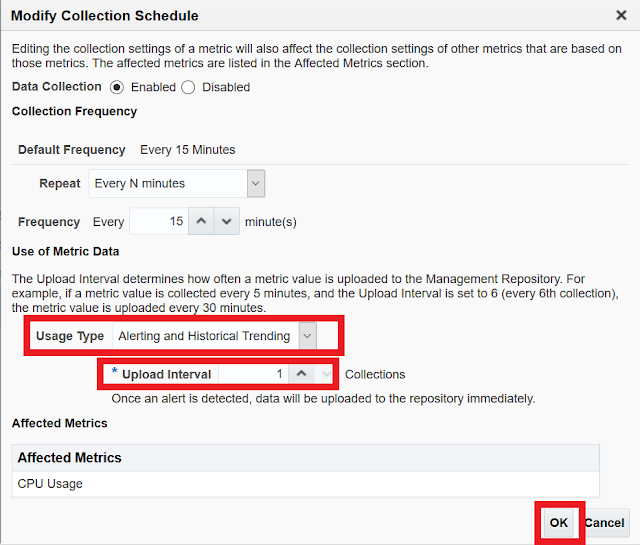
 'Usage Type' of 'Use of Metric Data' is setting "Alerting Only".

⇒This setting means, 'Upload Interval' of this metric is「On Alert].


SOLUTION 


1) Change 'Usage Type' of 'Use of Metric Data' is setting from "Alerting Only" to "Alerting and Historical Trending".

2)'Upload Interval' setting  a value except "0". ※The number must be greater than or equal to 1.

3) Click the "OK" button.

4) Wait for 15 minutes and verify the  EM Console, it will show metrics data.


※It can be changed too, in the following in EM console.

Login to OEM Console -> Navigate to the Host target -> Monitoring -> Metric and Collection Settings -> Edit Collection Settings: <Metric_name>


Document ID - 2630530.1

Saturday, February 17, 2024

Oracle Database Deployment: EC2 vs. RDS vs. Custom RDS


Oracle Database Deployment: EC2 vs. RDS vs. Custom RDS


Overview

This summary contrasts three deployment models for Oracle databases, assessing control, cost, management, scalability, and availability to guide strategic decision-making.

Deployment Options

Amazon EC2 (Self-Managed Oracle)

  • Control: Maximum, with complete customization.
  • Management: High responsibility; manual updates, maintenance.
  • Cost: Higher due to manual management and operational expenses.
  • Flexibility: Full, manual scalability and availability configurations.
  • Use Case: Niche applications requiring unique configurations or specific Oracle features.

Amazon RDS for Oracle

  • Control: Moderate, with managed service benefits.
  • Management: Lowered by automated tasks (backups, patching).
  • Cost: Reduced through managed services and no upfront hardware investment.
  • Flexibility: Built-in scalability and high availability (Multi-AZ).
  • Use Case: General business applications seeking balance between management ease and customization.

Custom RDS Solution for Oracle

  • Control: High, tailored environment for Oracle.
  • Management: Significant, akin to EC2 but with potential for cloud-agnostic deployment.
  • Cost: Varied, influenced by design complexity and infrastructure choice.
  • Flexibility: Custom-configured for scalability and DR.
  • Use Case: Specific scenarios needing cloud-agnostic setups or advanced Oracle functionalities not available in Amazon RDS.

Key Considerations

  • Operational Overhead vs. Automation: Choose between hands-on control (EC2, Custom RDS) and operational efficiency (Amazon RDS).
  • Cost Implications: Consider long-term TCO, balancing upfront investments against ongoing operational savings.
  • Scalability and Reliability: Weigh the need for manual setup and customization against the convenience of managed scalability and availability.

Recommendation

Aligning with business objectives and IT capabilities is paramount. Amazon RDS for Oracle is recommended for most use cases due to its balance of ease of use, cost-effectiveness, and built-in features. EC2 or Custom RDS may be suited for specialized requirements outside RDS's scope.


For a concise, one-page summary in a comparative format that highlights the differences between Amazon EC2, Amazon RDS for Oracle, and custom RDS solutions for Oracle, a table is an effective way to present the information clearly and facilitate quick comparison. This format supports executive decision-making by directly contrasting key aspects of each option.


Comparative Summary: Oracle Database Deployment Options

CriteriaAmazon EC2Amazon RDS for OracleCustom RDS Solution
ControlMaximum (full OS and DB control)Moderate (managed DB settings)High (customizable environment)
Management EffortHigh (manual setup and maintenance)Low (automated backups, patching)High (requires manual management)
Cost EfficiencyVariable (depends on management and scaling)High (reduced operational costs)Variable (depends on complexity)
ScalabilityManual (requires planning and execution)Automated (easy scaling options)Manual (flexible but complex)
High AvailabilityManual setup (custom HA configurations)Built-in (Multi-AZ for automatic failover)Manual setup (custom HA solutions)
Backup and RecoverySelf-managed (custom backup solutions)Automated (with point-in-time recovery)Self-managed (flexible strategies)
SecuritySelf-managed (custom security measures)Managed (encryption, network isolation)Self-managed (customizable security)
Use CaseSpecialized needs (specific configurations)General business applications (balance of ease and functionality)Specific scenarios (cloud-agnostic or advanced Oracle features)

Key Takeaways

  • Amazon EC2 offers the highest level of control and customization, suited for specialized deployments that require specific Oracle features or configurations not supported by RDS.
  • Amazon RDS for Oracle provides a managed service that balances ease of use with flexibility, ideal for businesses looking for cost-effective and scalable database solutions without the need for extensive database administration.
  • Custom RDS Solution is tailored for unique requirements, offering high control and flexibility, particularly for scenarios demanding cloud-agnostic deployments or leveraging advanced Oracle functionalities beyond RDS capabilities.

Strategic Recommendation

Evaluate business needs, technical requirements, and resource availability to select the most suitable deployment option. Consider Amazon RDS for its operational efficiency and cost benefits for standard applications, while EC2 or custom RDS solutions might be better suited for specialized requirements.bad